What to Consider Before Installing a Video Intercom System in an HDB Flat
30 Oct, 2026
12 Views 0 Like(s)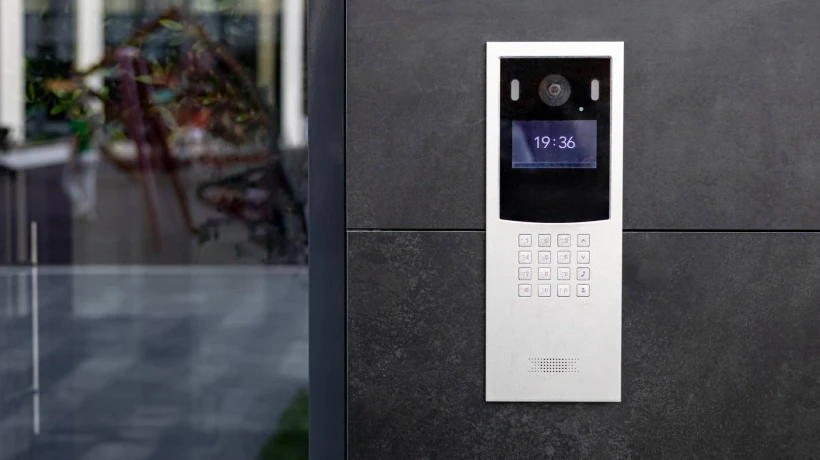
Planning a video intercom system for your HDB flat? Learn about wiring, HDB guidelines, smart features, and installation tips for reliable home security in Singapore.
Before installing a video intercom system in an HDB flat, homeowners need to assess their entryway layout, existing wiring conditions, HDB installation guidelines, and device compatibility. Key factors include whether the unit has a single or double gate, the distance between the gate and the indoor monitor, power source availability, and whether the system integrates with existing smart home or security setups.
Why HDB Flats Require a Different Approach to Video Intercom Installation
HDB flats are not like landed properties. The layout, shared corridors, and building regulations create specific constraints that affect how and where a video intercom system can be installed. Getting these details right before purchase saves you from expensive rework or incompatible equipment.
In Singapore, HDB governs what modifications residents can make to their units, including the gate and door area. Any installation that involves drilling into common corridor walls or ceiling may require prior approval. Understanding these boundaries is the first practical step.
Understanding Your HDB Entryway Layout
Most HDB flats have a standard entryway with a metal gate and a solid main door. The outdoor camera or doorbell unit is typically mounted on the gate post or wall beside the gate. The position matters because it affects the camera's field of view, cable routing, and weatherproofing needs.
Ask yourself these questions before proceeding:
-
Is your gate a single swing, double swing, or sliding gate?
-
How far is the gate from your indoor monitor placement?
-
Is the outdoor unit exposed to direct rain or sunlight?
-
Is there a shared corridor light that could cause glare at night?
A flush-mounted outdoor unit with an IP65 or higher weather resistance rating is generally recommended for HDB corridors, where humidity and occasional water splashing from corridor cleaning are common.
Wiring Considerations for HDB Intercom Installation
Wired vs. Wireless Systems
This is one of the most critical decisions for HDB homeowners. Wired systems offer more stable performance and are less prone to interference, but they require cable routing from the gate area into the flat which can be tricky depending on your unit's layout and existing conduits.
Wireless systems using Wi-Fi are simpler to install and avoid cable management challenges. However, thick HDB walls and metal gate structures can weaken the Wi-Fi signal. If your router is located far from the front door, you may experience lag or dropped connections.
What to Check Before Running Cables
If you opt for a wired HDB intercom installation, check whether there is an existing conduit from the gate area into the flat. Many older HDB units have a conduit left over from a previous door phone installation. If that conduit is accessible, running new cables becomes significantly easier.
For units without existing conduits, cables are typically run along the door frame or skirting using cable clips or trunking. This should be done neatly and in a way that does not damage the common corridor which remains HDB property.
HDB Regulations and Approved Works
HDB has clear guidelines on what constitutes an approved home improvement. Under the HDB Branch portal and the guidelines outlined on the HDB official website, residents are permitted to install door video systems at their own entrance, provided the installation does not affect the structural integrity of the building or infringe on common property.
Key regulatory points to note:
-
Do not drill into common corridor walls without approval.
-
Avoid mounting any unit that obstructs corridor access or emergency exit paths.
-
Electrical work beyond basic plug-in installation may require a Licensed Electrical Worker (LEW) in Singapore.
-
Any works that alter the façade of the flat (e.g., drilling into the external wall) may require prior written approval from HDB.
Choosing the Right Video Intercom System for Your Flat
Screen Size and Monitor Placement
Indoor monitors typically come in 7-inch or 10-inch screen sizes. For HDB flats where wall space near the main entrance is limited, a 7-inch unit is usually sufficient. Consider where you will mount the monitor it should be at a comfortable eye level and easily accessible when you hear the doorbell.
Smart Features Worth Considering
Modern video intercom systems in Singapore come with features that go well beyond a basic two-way call. Depending on your HDB home security needs, look for:
-
Remote mobile access: View and speak with visitors from anywhere via a smartphone app.
-
Motion detection and recording: Automatically captures footage when motion is detected at the gate.
-
Night vision: Essential for HDB corridors that may have dim lighting after midnight.
-
Electric lock integration: Allows remote gate unlocking useful if your gate has an electromagnetic or electronic lock.
Power Supply at the Gate
The outdoor unit needs a power source. Some systems draw power through the communication cable itself (PoE or 2-wire systems), while others require a separate power supply. For HDB flats, running a dedicated power cable to the gate area may not always be practical. Confirm the power requirements of the outdoor unit before purchase.
Compatibility With Existing Security Systems
If you already have a CCTV system or smart lock installed, check whether your chosen video intercom Singapore solution can integrate with it. Some systems use proprietary protocols that do not play well with third-party devices. Open-platform systems or those that support common standards like SIP or ONVIF are generally more flexible for future upgrades.
A well-planned HDB home security setup treats the video intercom as one component in a broader system not a standalone device. Think about how it connects with your alarm system, smart lock, and home automation hub if you have one.
Professional Installation vs. DIY
Some wireless video intercom systems are genuinely DIY-friendly and can be set up within an hour. However, wired systems especially those requiring cable routing through conduits, wall trunking, or electrical connections are better handled by a professional installer.
A professional installer familiar with HDB layouts will know how to route cables cleanly, ensure the outdoor unit is positioned correctly for camera angle and weather protection, and configure the system for optimal performance. This avoids common mistakes like poor camera angles, weak connections, or installations that may not comply with HDB guidelines.
If you are ready to explore options suited for HDB flats, Kirin CCTV offers a range of video intercom systems designed for residential use in Singapore, with professional installation support to ensure a clean and compliant setup from the start.
Frequently Asked Questions
Can I install a video intercom system in my HDB flat without HDB approval?
You can install a video intercom at your own entrance without prior HDB approval, as long as the installation does not affect common property, obstruct corridors, or involve structural changes. Any drilling into common corridor walls or external façade work typically requires written approval from HDB before proceeding.
What is the best type of video intercom for an HDB flat wired or wireless?
Both work in HDB flats, but the right choice depends on your layout. Wired systems offer more reliability, while wireless systems are easier to install. If your router is far from the front door or your walls are thick, a wired system may deliver more consistent performance for daily use.
How long does it take to install a video intercom system in an HDB flat?
A professional installation typically takes two to four hours for a standard HDB unit. Wireless systems can be faster, while wired systems with cable routing through conduits may take longer. Complexity increases if existing wiring needs to be replaced or if electric lock integration is required.
Do I need a licensed electrician to install a video intercom in Singapore?
If the installation involves new electrical wiring or connection to the mains power supply, Singapore's Energy Market Authority requires the work to be carried out by a Licensed Electrical Worker (LEW). Basic plug-in or low-voltage intercom systems may not require an LEW, but it is advisable to confirm with your installer beforehand.
Can an HDB video intercom system connect to my smartphone?
Yes, most modern video intercom systems support mobile app connectivity, allowing you to see and speak with visitors remotely. Ensure the system you choose has a stable Wi-Fi connection near the front door or supports a wired network connection for reliable remote access from your smartphone.
What camera features should I look for in a video intercom for an HDB corridor?
Look for wide-angle lens coverage, night vision, and at least IP65 weather resistance. HDB corridors are often narrow, so a 120° to 160° field of view helps capture a wider area. Night vision is essential as corridor lighting after midnight can be insufficient for standard cameras without infrared capability.
Comments
Login to Comment