What Features Should You Look for in a Video Wall Display?
28 Oct, 2026
14 Views 0 Like(s)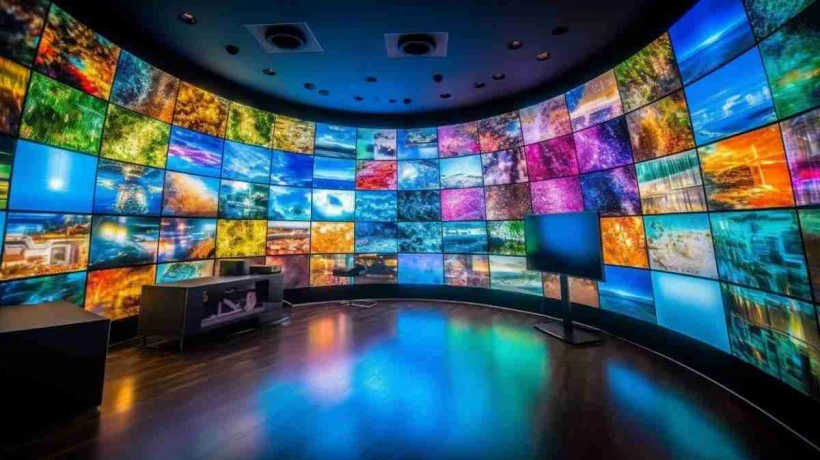
When selecting a video wall display, prioritise resolution, bezel width, processor capability, input connectivity, and long-term reliability.
When choosing a video wall display, factors to consider include resolution, bezel width, processor capability, input connectivity, and long-term reliability. These five elements determine if the system can perform under constant operational pressure—especially in environments like control rooms, network operations centers, and command facilities where downtime is just not an option.
The stakes are high for IT teams and AV professionals when they are considering display infrastructure. A poorly defined system creates visual blind spots, creates bottlenecks in data feeds, and fails under 24/7 loads. Getting the specification right the first time can save a great deal of cost and disruption later on.
Here’s what to look for, and why each feature matters in practice.
Resolution: Beyond the Number of Pixels
Typically the first number quoted on any display spec sheet is resolution, but raw pixel count is only part of the story. What matters more is the effective resolution of the entire canvas—this is the total pixel output of all panels in the array combined.
The 3×3 video wall of full HD (1920×1080) panels has a total resolution of 5760×3240 pixels. Move up to 4K panels, and that number quadruples. Operational clarity in control room environments that process SCADA feeds, GIS maps, and high-resolution CCTV footage simultaneously is directly impacted by the resolution of the aggregate.
What Resolution Should You Aim For?
It is dependent on the viewing distance and the content type. A general rule of thumb is
-
Full HD panels are good for general signage and meeting room displays viewed from 3 meters or more.
-
4K Ultra HD panels are recommended for control rooms where operators monitor fine data at close range.
-
Direct View LED tiles are best for large-format applications where seamless imagery is more important than pixel density at close viewing distances.
Pixel pitch matters here, too—the closer the pitch, the higher the density and the sharper the image will be up close. For indoor control room applications, a pixel pitch of typically between 1.2mm and 2.5mm is ideal.
The Disruptive Factor in Visibility: Bezel Width
The bezel is the physical border around each display panel in a video wall system. Bezel seams are visible on a multi-panel array. Wide bezels can break apart critical information in places where information is divided across multiple screens, such as network topology maps or city surveillance feeds.
The combined bezel width (the space between two neighboring panels) of modern LCD panels with narrow bezels is as small as 1.7mm to 3.5mm. Ultra slim bezels, in the 1.7 to 1.8 mm range, are now standard in professional control room installations.
For applications where even a sub-2mm seam is unacceptable, such as in high-stakes unified display environments, Direct View LED eliminates bezels entirely to create a truly seamless canvas.
Video Wall Controller: The Display’s Driving Force
The controller driving the video wall display is its best performance factor. The video wall controller accepts multiple inputs, processes them at the same time, and distributes the output to each panel in the array—all in real time.
A weak controller will cause lag and dropped frames and will limit how content can be arranged across the wall. In contrast, a dedicated controller allows operators to drag, resize, and move content windows on the fly, which is crucial in dynamic operational scenarios.
Key Controller Features to Evaluate
-
Input channels: Will it handle all your concurrent sources—IP cameras, PC feeds, video streams, and external devices?
-
Decoding Performance: Can it decode H.264, H.265, and 4K streams without dropping frames?
-
Redundancy: Does it provide failover support or hot-swap capability to prevent single-point failures?
-
Layout presets: Can operators easily toggle between one pre-configured display layout and another?
-
Scalability: Can you add more input cards/screens without changing your core unit?
Distributed controller architectures—where processing is spread across multiple nodes—provide better resilience and easier expansion than single-box solutions for large-scale deployments.
Connectivity: Inputs, Protocols, and Integration
A high-resolution display array is only as good as its ability to accept and process the inputs your infrastructure requires. Connectivity requirements vary greatly across environments, so this needs careful audit prior to procurement.
Input Types to Check
-
HDMI 2.0/2.1 for regular PC and media sources
-
DisplayPort 1.4 for high-bandwidth, high-res workstation feeds
-
SDI for broadcast quality video in production or media environments
-
Networked AV Environments with NDI and IP Streaming
-
DVI for legacy system support
Protocol support matters beyond physical connectors. For example, KVM-over-IP infrastructure needs controllers able to decode signals arriving from the network without latency. Broad protocol support reduces expensive signal conversion hardware for organizations operating on mixed legacy and modern infrastructure, common in Malaysian enterprise and government deployments.
Operating Hours and Reliability
We operate control rooms and network operations centers 24/7. A screen rated for normal business use, typically 12 to 16 hours a day, will degrade fast if used around the clock. Professional video wall panels are built for 24/7 continuous operation, with MTBF (Mean Time Between Failures) ratings usually exceeding 50,000 hours.
Major reliability metrics:
-
Operating hours rating: Look for panels that are specifically rated for 24/7 or 24 hours x 7 days.
-
Thermal management: Good heat dissipation increases panel life and reduces cooling cost.
-
Brightness stability: Panels should not dim unevenly but maintain consistent brightness over time.
-
Warranty & Service SLA: On-site support with defined response times is essential for mission-critical installations
LCD vs. Direct View LED Display Technologies
|
Feature |
LCD Video Wall |
Direct View LED |
|
Frame |
1.7 mm–3.5 mm (thin) |
Zero bezel |
|
Resolution |
High (4K/FHD per panel) |
Pixel pitch dependent |
|
Best distance to view |
1.5m+ readers |
Varies by pitch situation |
|
Service life: |
50,000 to 100,000 hours |
100,000+ hours |
|
Typical usecase |
NOCs, control rooms |
Command centers, big venues |
|
price |
Lower front end |
Higher initial |
Scalability & Future Proofing
Operationally, needs change. “If you don’t have a scalable video wall system, you’re going to be a liability in three to five years. When evaluating options, ask questions about whether the controller architecture supports adding more panels, if the vendor will provide software updates over time, and if the system works with developing standards like IP-based AV distribution (AVoIP).
For organizations expecting an increase in data sources or operational complexity, modular architectures—where input cards, processing nodes, and display panels can be expanded independently—provide the greatest long-term value.
Final Considerations Before Specifying
Before you complete a specification, run through this checklist:
-
What is the ambient light level of the installation environment? This affects how bright the panel needs to be (measured in nits).
-
How many simultaneous inputs will the system need to handle at maximum load?
-
Does the installation require failover or redundant power or a controller?
-
What are the physical constraints for mounting, i.e., depth, weight, and wall load capacity?
-
Does the display system need remote monitoring and management?
Each of these factors affects the final configuration. Getting them wrong at the specification stage is far more expensive than fixing them up front.
Votigo Systems provides purpose-built engineered video wall systems for Malaysian organizations seeking control room and operations center solutions for continuous, mission-critical deployment with the right display hardware, controller infrastructure, and integration support.
Frequently Asked Questions (FAQ)
What is the ideal bezel size for a control room video wall display?
The professional standard for control rooms is a total bezel width of 1.7mm to 3.5mm. Thinner bezels reduce the visual distraction when viewing content across multiple panels—important when using them to keep an eye on maps, dashboards, or surveillance cameras across the entire display wall.
What is the difference between a video wall controller and a regular AV matrix switcher?
A video wall processor is able to take multiple signal sources, scale them, and route them to a display array at the same time, with the ability to control the layout in real time. A matrix switcher is a device that can route signals from one source to one output. Controllers offer much more operational flexibility and are critical for dynamic, multi-source environments.
Can a video wall system run 24 hours a day continuously?
Yes, as long as the panels are rated for 24/7. Professional-grade video wall displays are rated for 24-hour continuous operation, and MTBF ratings are typically in excess of 50,000 hours. Standard commercial displays are not built for this load and will deteriorate substantially with continuous use.
What connectivity inputs would a video wall system have?
You want a well-defined system that supports HDMI 2.0, DisplayPort 1.4, IP/NDI streaming, and ideally SDI for broadcast environments. The DVI compatibility means that some facilities with older infrastructure will require fewer signal converters. Your input mix should reflect your current sources and allow for future integration requirements.
What is the difference between LCD and Direct View LED for video walls?
LCD video walls consist of backlit panels with physical bezels between screens. They are an affordable solution for control rooms with short viewing distances. Direct View LED Modular tile arrays, no bezels, better brightness and longer lifespan, and are good for larger command centers or where a completely seamless visual canvas is needed.
How do I pick the right resolution for a video wall display?
Resolution depends on the viewing distance and type of content. For control rooms with operators seated close to the screen, 4K panels with tight pixel pitch offer the clearest detail. In larger rooms, or for signage that is viewed from a distance, Full HD panels are usually sufficient and more economical.

Comments
Login to Comment