PST Files and Email Evidence: Separating What Actually Works From What Just Sounds Right
04 Jul, 2026
1141 Views 0 Like(s)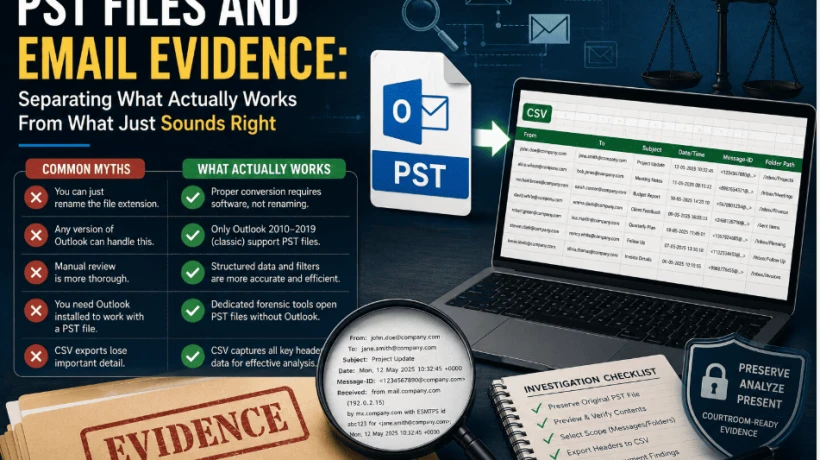
A guide busting common PST myths—file renaming, Outlook versions, and manual review—while showing the right way to extract email evidence.
Talk to enough people about handling PST files for an investigation, and you'll notice the same handful of misconceptions come up again and again. Some come from IT folklore, some from outdated advice, and some from people who've simply never had to deal with a 40,000-message mailbox under a deadline. Clearing those up is often more useful than another list of best practices, because half the battle is knowing what not to try.
Misconception 1: "You Can Just Rename the File Extension"
This one refuses to die. The idea that swapping .pst for .csv in the file name magically converts the file is, unfortunately, still common advice floating around online. It doesn't work. PST is a proprietary binary format; a CSV is plain text. Forcing the extension change doesn't translate one into the other, it just leaves you with a file your computer can't meaningfully open, and it risks damaging the original archive in the process. If the goal is a usable, text-based export, the conversion has to actually happen through software, not a file rename.
Misconception 2: "Any Version of Outlook Can Handle This"
Not quite. PST import and export is a feature of the classic desktop builds, Outlook 2010, 2013, 2016, and 2019. The New Outlook for Windows and the Outlook web app were built around cloud-first mail handling and simply don't support PST files the same way. Teams that assume "Outlook is Outlook" often waste real time troubleshooting before realizing the version installed on a given machine is the actual problem.
Misconception 3: "Manual Review Is More Thorough"
There's a persistent belief that opening every email individually is somehow more careful or more accurate than an automated export. In practice, it's usually the opposite. Human attention degrades over long review sessions, and a reviewer scanning thousands of near-identical messages is statistically more likely to miss the one anomaly that matters than a structured search across exported header data would be. Thoroughness in a large-scale investigation comes from systematic filtering, not from sheer volume of manual clicking.
Misconception 4: "You Need Outlook Installed to Work With a PST File"
This assumption sends a lot of people down an unnecessary path — setting up a mail profile, configuring accounts, waiting on sync — just to get a look inside a mailbox archive. It isn't actually required. Dedicated Email Forensics software can open a PST file directly and independently, without any Outlook installation or configured email account, and provide a full preview of folders, messages, and attachments straight away. That alone removes a surprising amount of friction from the early stages of a review.
Misconception 5: "CSV Exports Lose Important Detail"
Some investigators hesitate to convert header data into CSV format, worried that something meaningful gets stripped out along the way. In reality, a properly configured export captures exactly the fields that matter for analysis — sender, recipient, subject, timestamp, message ID, and folder path — without discarding anything relevant to header-level review. What it does drop is the full email body and attachment content, which is expected: a header export was never meant to replace the original PST as the source of record. It's meant to make the metadata searchable, which the original mailbox format simply isn't.
So What Does Actually Work?
Once the myths are out of the way, the practical approach is fairly straightforward. The mailbox stays intact and untouched as the authoritative source. A dedicated tool opens the PST independently and gives investigators a preview before anything is exported. Header fields relevant to the type of data — email, calendar, chat — get pulled into a structured file rather than left buried inside individual messages. And that structured file becomes the working document for the actual analysis: sorting by date, filtering by sender, checking message IDs against other evidence.
This entire approach is what people are really referring to when they talk about learning to Export PST File into CSV File Format — not a shortcut, and not a way to bypass proper evidence handling, but a deliberate step that turns an unmanageable archive into something a spreadsheet can actually work with.
Why the Myths Persist
Most of these misconceptions survive because they sound plausible on the surface. Renaming a file extension seems like it should work, since it's how a lot of casual file-format confusion gets resolved elsewhere. Assuming "Outlook is Outlook" seems reasonable until you hit the version wall. Manual review feels more rigorous simply because it takes more visible effort. None of that makes the assumptions correct, but it explains why they keep circulating in forums and informal advice threads.
A Quick Reality Check Before Starting Any PST Review
Before diving into a large mailbox, it's worth confirming a few things: which Outlook version, if any, is actually available; whether the review needs to preserve strict evidentiary integrity (in which case a dedicated tool, not a live Outlook client, is the safer choice); and how many folders or messages are realistically in scope, since that number should drive the decision between selective export and a full bulk export.
Final Word
A lot of wasted time in email investigations comes down to acting on advice that sounds right but isn't. PST files don't convert by renaming them, Outlook versions aren't interchangeable, and manual review isn't automatically more careful than a structured export. Once those assumptions are set aside, the actual path forward — preview, select, export, analyze — is a lot shorter and a lot more reliable than most people expect going in.



Comments
Login to Comment