Convert MSG to EML: Keep CC, BCC & Email Headers Intact
04 Jul, 2026
1181 Views 0 Like(s)
You should not lose CC, BCC, and email headers when you convert Outlook MSG to EML. Worried about losing vital email details during conversion? This article describes common causes and the best way to keep complete email properties. Learn how to convert MSG to EML safely with attachments, metadata, CC, BCC, and email headers intact using a reliable and accurate conversion solution.
Introduction
If you’ve ever tried to open Outlook MSG files in Thunderbird, Windows Live Mail, Apple Mail, or another email application, you’ve probably found that MSG files aren’t supported everywhere. The simplest way is to convert them to EML format. However, many users are afraid of doing this because they may lose important email information like CC, BCC, email headers, or attachments. This is a concern for professionals, companies, legal teams, and organizations that need to keep a complete record of emails. Missing email properties make it hard to validate conversations, stay compliant, or keep accurate records. Thankfully, using the best TrustVare MSG to EML converter, you can easily convert Outlook emails without missing any crucial email parts.
Why should users convert MSG to EML?
MSG is the native email format of Microsoft Outlook, whereas EML files can be opened by many popular email clients. When you are moving from one email platform to another, or you want to share Outlook emails with a non-Outlook user, or you are migrating old email archives, then you need to convert MSG files into EML.
However, many users rely on free online converters or manual methods that do not preserve the entire email structure. This means they have incomplete or damaged emails.
Common Problems in Converting MSG to EML
The following are the issues encountered by multiple users while converting Outlook emails:
- CC and BCC recipients are stripped after conversion.
- They alter or remove email headers.
- Attachments are missing or unavailable.
- Accidental switch to HTML formatting.
- Inline images broken.
- Sender and recipient information is altered.
- Manually converting tons of MSG files consumes too much time.
- Some EML files are not opening in email clients after conversion.
Most often, the cause of these issues is poor conversion techniques or software that does not support an entire migration of email.
Why do email headers, including CC and BCC, matter?
Many users only look at the body of the email and the attachments, but CC, BCC, and email headers are just as important.
The CC (Carbon Copy) shows who else the email was sent to.
BCC (Blind Carbon Copy) logs recipients that received the email privately.
Email headers include routing information, sender information, time stamps, message IDs, and server information. If you don’t have those properties, the converted email may no longer be suitable for legal documentation, compliance audits, technical investigations, or business communication.
What causes the email properties to be lost?
There are many reasons why important email data can be lost during conversion:
- By using free online converters.
- Choosing an unreliable converter.
- MSG files are corrupted.
- The copying process has been stopped.
- No manual conversion methods supported.
- Attempting to convert multiple files using the incorrect software can lead to partial email conversion and unnecessary data loss.
The wrong way often leads to partial email conversion and unnecessary data loss.
Convert MSG to EML Securely
The safest way is the MSG to EML converter. The software has a special ability to convert Outlook MSG files into EML format with all email properties.
The software maintains the status during conversion.
- CC / BCC info
- Internet E-mail Headers
- Sender and receiver information
- Subject:
- Time & Date Stamps
- Attachments
- HTML format
- Pictures inline
- Subject: Email
The software converts a few emails or a complete Outlook archive accurately and securely without modifying the original email content.
Easy Methods to Convert MSG to EML
The conversion process is easy enough for beginners.
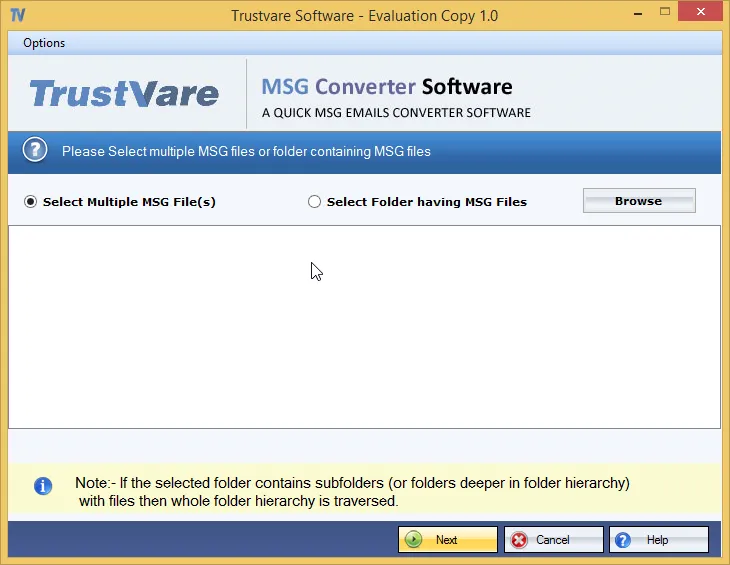
Step 1: Download and launch TrustVare MSG to EML Converter.
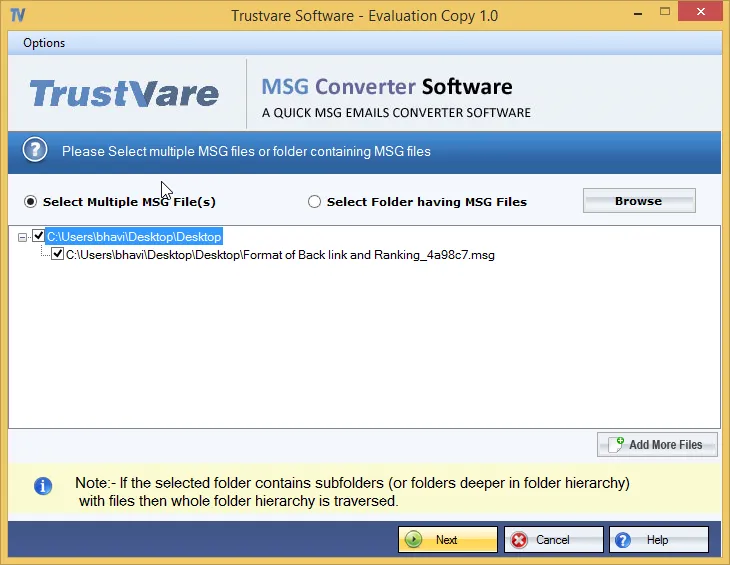
Step 2: Import single MSG files or load a full folder.
Step 3: Preview the emails you selected.
Step 4: Select EML as output format.
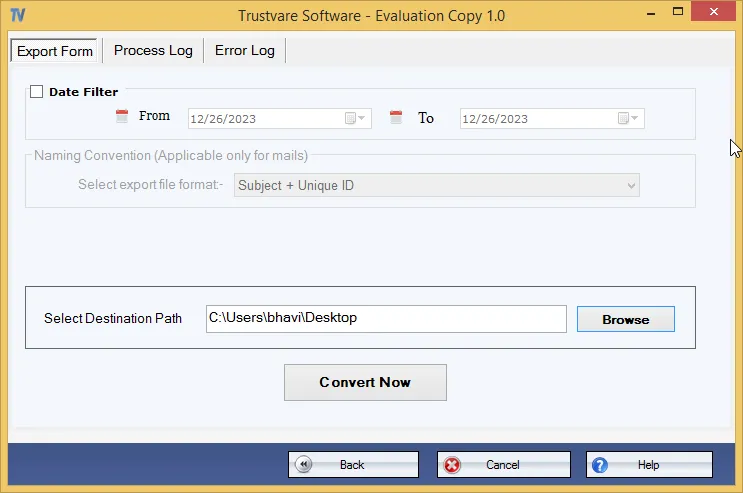
Step 5: Choose a destination folder.
Step 6: Press the Convert button.
The software converts all selected MSG files quickly and keeps all the important details of the email intact.
Advantages of MSG to EML Converter
There are several important advantages of using a professional solution:
- Converts single and multiple MSG files.
- Retains CC, BCC, and complete email headers.
- Keeps original email formatting.
- Converts attachments safely in the process.
- Supports bulk email conversion for large email archives.
- You don't have to install Microsoft Outlook.
- Provides correct & safe conversion.
- Works on all major versions of Windows.
- Creates EML files compatible with Thunderbird, Windows Live Mail, Apple Mail, eM
- Client and many other email clients.
- Saves precious time and reduces manual labor.
Why use a professional converter instead of doing it yourself?
Manual methods may appear free, but they involve complicated procedures and cannot guarantee complete data preservation. They also don't work well for converting hundreds or thousands of emails. An expert MSG to EML converter automates the entire conversion process and keeps the integrity of the email. It reduces the chance of data loss to a great extent, and users can complete the migration quickly and accurately.
Frequently asked questions (FAQ)
1. Is it possible to convert MSG to EML without losing CC, BCC, and email headers?
Yeah. MSG to EML Converter keeps CC, BCC, email headers, attachments, formatting, and all other email properties intact while converting.
2. Are my email attachments safe after conversion?
Sure. This software keeps all the attachments so that you can get to the documents, images, PDFs, and other attached files even after the conversion.
3. Do I need MS Outlook to convert MSG files?
No, the software works standalone, so you don't need to install Outlook.
4. Would it be possible to convert several MSG files at once?
Yes. The software supports bulk email conversion, which means that you can convert hundreds or thousands of MSG files in one go.
5. Does the software retain email formatting?
Definitely. HTML formatting, inline images, hyperlinks, sender and recipient information, timestamps, and other email properties are preserved.



Comments
Login to Comment