How to Find Hidden Text in Emails Like a Forensic Expert
08 Jul, 2026
1073 Views 0 Like(s)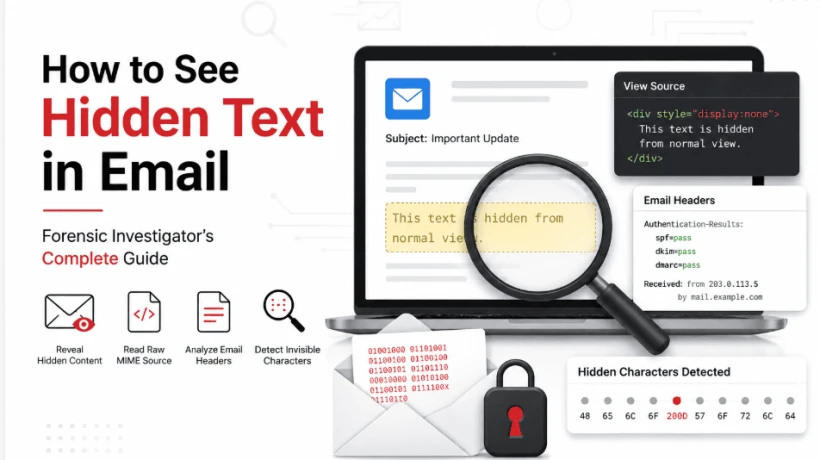
Learn how to detect hidden text in emails using MIME analysis, email headers, HTML source, and Unicode inspection with proven forensic techniques.
Hidden Email Content: Practical Ways Investigators Uncover What Isn't Immediately Visible
Blog Overview
Most emails appear harmless when viewed in an inbox. However, what users see is often only the rendered version of the message. Behind the visible content can be hidden HTML elements, invisible Unicode characters, concealed tracking information, or encoded data that never appears on the screen.
These techniques are regularly encountered during phishing investigations, insider threat cases, business email compromise incidents, and digital forensic examinations. Understanding how hidden content works allows investigators to identify evidence that ordinary email clients never display.
Table of Contents
-
Understanding Hidden Email Content
-
Method 1: Identify Invisible HTML Elements
-
Method 2: Inspect the Original Email Source
-
Method 3: Review Complete Email Headers
-
Method 4: Detect Hidden Unicode Characters and Steganography
-
Conclusion
-
Frequently Asked Questions
Understanding Hidden Email Content
Hidden email content refers to information intentionally concealed from the normal reading view while remaining part of the actual message. Since email clients render HTML differently, attackers often take advantage of formatting tricks that hide specific portions of the email.
Some techniques are straightforward, while others require forensic analysis to uncover.
|
Concealment Technique |
Purpose |
Investigation Difficulty |
|
White font matching background |
Spam evasion |
Easy |
|
CSS hidden elements |
Concealed HTML content |
Medium |
|
Tiny font sizes |
Invisible rendered text |
Medium |
|
HTML comments |
Hidden developer notes |
Easy |
|
Zero-width Unicode characters |
Secret data embedding |
Hard |
|
Base64 encoded sections |
Hidden payloads |
Hard |
|
Image steganography |
Concealed information inside images |
Hard |
Every method leaves different forensic artifacts, making it important to examine emails from multiple perspectives.
Method 1: Identify Invisible HTML Elements
One of the fastest checks involves looking for text intentionally hidden through formatting.
Begin by selecting all content within the email. Hidden white text often becomes visible once highlighted.
Next, inspect the HTML version of the message whenever your email client provides a "View Source" or "Show Original" option.
Search for indicators such as:
-
display:none
-
visibility:hidden
-
font-size:0
-
Hidden <div> or <span> elements
These properties frequently appear in phishing campaigns, spam messages, and manipulated marketing emails designed to bypass filters.
Method 2: Inspect the Original Email Source
Every email follows the MIME standard, which separates content into different sections including plain text, HTML, attachments, and embedded objects.
Viewing the complete message source often exposes information that never appears in the inbox.
For Gmail, open the message menu and choose Show Original.
For Outlook, open the message source from the available message options.
While reviewing the raw content, examine:
-
HTML comments
-
Base64 encoded sections
-
Embedded resources
-
Multiple MIME boundaries
-
Suspicious hyperlinks
Reading the original source provides investigators with a complete picture of the message structure instead of only its visual appearance.
For readers looking for a more detailed walkthrough, How to See Hidden Text in Email explains these inspection techniques in greater depth.
Method 3: Review Complete Email Headers
Email headers reveal valuable metadata about message delivery, authentication, and routing.
Rather than focusing only on the sender address, investigators should review authentication results and transmission history.
Important fields include:
-
Authentication-Results
-
SPF
-
DKIM
-
DMARC
-
Message-ID
-
Received headers
Reading the "Received" entries from the bottom upward helps identify the originating mail server. Investigators can also verify IP addresses using public registry databases to determine hosting providers and geographic information.
Header analysis frequently exposes spoofed emails that appear legitimate in the inbox.
Method 4: Detect Hidden Unicode Characters and Steganography
Sophisticated attackers sometimes embed invisible Unicode characters within normal text.
Examples include:
-
Zero Width Joiner (U+200D)
-
Zero Width Non-Joiner (U+200C)
Although invisible to readers, these characters can store hidden information or create unique fingerprints inside email content.
Image attachments may also contain concealed data using steganographic techniques that cannot be identified through visual inspection alone.
Investigators commonly:
-
Examine Unicode values using hex editors.
-
Analyze file size inconsistencies.
-
Inspect embedded image metadata.
-
Compare hashes across multiple copies.
-
Use specialized forensic analysis tools for automated detection.
When handling hundreds or thousands of messages, dedicated email forensics software significantly reduces manual effort while preserving evidence integrity throughout the investigation.
Conclusion
Hidden content inside emails ranges from simple formatting tricks to advanced concealment methods involving Unicode manipulation and embedded payloads. Manual inspection is useful for examining individual messages, but larger investigations benefit from systematic forensic analysis that uncovers hidden artifacts while maintaining evidentiary integrity.
Frequently Asked Questions
Can hidden information exist inside a normal email?
Yes. Hidden HTML, invisible Unicode characters, encoded content, and concealed image data can all exist without being displayed in a standard email client.
What is the quickest way to check for hidden content?
Start by selecting all text, then inspect the original message source and review the complete email headers for unusual HTML elements or authentication anomalies.
Why is MIME analysis important?
MIME reveals every component of an email, including hidden HTML, encoded attachments, embedded objects, and multiple content sections that may never appear in the rendered message.
Are manual techniques enough for enterprise investigations?
Manual methods work well for individual emails. Large investigations involving thousands of messages typically require forensic tools that automate hidden content detection while preserving digital evidence.



Comments
Login to Comment