7 Signs Your AI Generated App Needs Engineering Cleanup Before You Add More Features
29 Oct, 2026
7 Views 0 Like(s)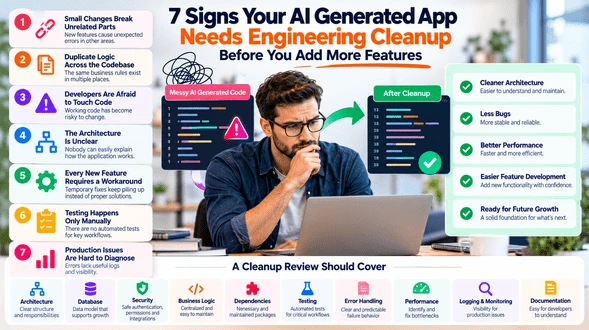
AI generated applications can reach a point where new features create more problems than progress. These seven warning signs show when cleanup should come before further development.
AI coding tools make software experimentation faster.
A founder can create authentication, dashboards, database tables, APIs, payments, forms, and integrations without building every component manually.
That speed is valuable while testing an idea.
The challenge starts when the product keeps growing on top of code that was generated for speed rather than long term maintainability.
At that point, Vibe Coding Cleanup can help separate working functionality from the technical problems that will make future development slower, riskier, and more expensive.
The question is not whether AI generated the application.
The question is whether the current codebase can support what the business wants to build next.
1. Small Features Keep Breaking Unrelated Parts of the App
One of the clearest warning signs is unexpected regression.
A developer changes the checkout page and authentication stops working.
A new dashboard filter breaks reporting.
A profile update affects account permissions.
This usually means different parts of the application are too tightly connected.
Generated code may solve each prompt successfully without maintaining clear boundaries between responsibilities.
Before adding more features, review:
-
Component responsibilities
-
Shared business logic
-
Data flow
-
State management
-
API dependencies
A cleaner structure reduces the chance that one change affects several unrelated areas.
2. The Same Logic Exists in Several Places
Rapid AI development often creates duplicate logic.
For example, subscription status may be checked in:
-
Frontend
-
Backend
-
Billing workflow
-
Admin dashboard
-
Reporting logic
Everything may work while the rules remain unchanged.
Problems appear when the business changes the definition.
Now several pieces of code must be updated together.
Important business rules should have one clear source wherever practical.
Removing duplicate logic makes future changes safer and easier to test.
3. Developers Are Afraid to Touch Working Code
Working code should not become untouchable code.
If developers regularly say:
We should not change that because nobody knows what else it affects.
the application has a maintainability problem.
This often happens when:
-
Functions are too large
-
Responsibilities are mixed
-
Naming is unclear
-
Documentation is missing
-
Tests do not exist
-
Dependencies are difficult to trace
A cleanup phase should make the system easier to understand before the development team continues expanding it.
4. Nobody Can Explain the Architecture Clearly
A healthy application should have an understandable structure.
Someone on the development team should be able to explain:
Frontend
How the interface is organized.
Backend
Where business logic lives.
Database
How important records relate.
Authentication
How users and permissions work.
Integrations
Which external services are connected.
Deployment
How changes reach production.
If understanding the application requires opening random files and tracing code for hours, the product needs clearer architecture.
Documentation alone may help.
In other cases, the structure itself needs refactoring.
5. Every New Feature Requires Another Workaround
Workarounds are sometimes acceptable during experimentation.
They become dangerous when they turn into the normal development method.
Examples include:
-
Copying code from another feature
-
Adding another database column instead of modeling a relationship
-
Hardcoding another exception
-
Creating another temporary API
-
Adding another condition to a large function
-
Storing business rules inside the interface
One workaround is manageable.
Repeated workarounds usually indicate that the underlying architecture no longer fits the product.
At that point, fixing the foundation may be faster than continuing to build around it.
6. Testing Happens Only by Clicking Around
Manual testing is useful.
It should not be the only protection against regression.
As the application grows, important workflows need automated coverage.
Start with areas such as:
-
Login
-
Registration
-
Payments
-
Permissions
-
Subscription changes
-
Customer records
-
Integrations
-
File uploads
-
Critical calculations
Tests give developers confidence to refactor.
Without them, cleanup becomes risky because nobody knows whether an internal change altered existing behavior.
7. Production Issues Are Hard to Diagnose
When something fails, the team should be able to understand why.
Warning signs include:
-
Errors without useful messages
-
No application logs
-
External API failures disappearing silently
-
No record of background jobs
-
No monitoring
-
Customer complaints becoming the first alert
Production software needs visibility.
Logging and monitoring should help teams understand:
-
Which user triggered the action
-
Which process failed
-
Which external service was involved
-
What record was affected
-
When the failure happened
A system that cannot explain its own failures becomes difficult to operate as usage grows.
What Should a Cleanup Review Cover?
A useful engineering review should examine several areas together.
Architecture
Are responsibilities separated clearly?
Database
Does the structure support current and planned features?
Security
Are authentication, permissions, secrets, and APIs handled safely?
Business Logic
Are important rules centralized?
Dependencies
Are packages necessary and maintained?
Testing
Are critical workflows protected?
Error Handling
Does the application fail predictably?
Performance
Are there obvious bottlenecks?
Logging
Can production issues be investigated?
Documentation
Can another developer understand the system?
The goal is to create a prioritized improvement plan.
Not every issue needs immediate correction.
Do Not Rewrite Everything Automatically
A messy codebase does not always need a complete rebuild.
A full rewrite can introduce new bugs, extend timelines, and replace working functionality unnecessarily.
A better approach is often:
Keep
Stable components that already work well.
Refactor
Areas with poor structure but usable foundations.
Replace
Components whose design fundamentally blocks future requirements.
This keeps the cleanup focused on business value.
Prioritize Issues by Risk
Not every technical problem is equally important.
A practical order may be:
Critical
Security vulnerabilities, data loss risks, broken permissions, payment issues.
High
Architecture problems that repeatedly block development.
Medium
Duplicate logic, poor error handling, missing tests.
Low
Naming, formatting, minor organizational issues.
This prevents the team from spending weeks polishing low impact code while serious production risks remain.
Clean Up Before the Next Major Growth Phase
The best time to review an AI generated application is usually before complexity increases significantly.
Useful checkpoints include:
-
Before launching to paying customers
-
Before adding another development team
-
Before building major new features
-
Before integrating financial systems
-
Before handling sensitive customer data
-
Before scaling traffic significantly
-
Before raising the cost of future migration
Technical debt becomes harder to correct as more features and customers depend on the existing structure.
AI Speed and Engineering Discipline Can Work Together
Vibe coding is useful because ideas can become working prototypes quickly.
Engineering cleanup protects that speed from becoming future friction.
The goal is not to replace everything AI generated.
The goal is to keep the parts that work, improve the areas creating risk, and give future development a cleaner foundation.
When new features repeatedly create regressions, developers hesitate to change code, and the architecture becomes difficult to explain, adding more functionality may not be the next step.
Cleaning the foundation may be the faster route to building what comes next.


Comments
Login to Comment