What to Do When Your Phone Suddenly Stops Charging
18 Sep, 2026
6 Views 0 Like(s)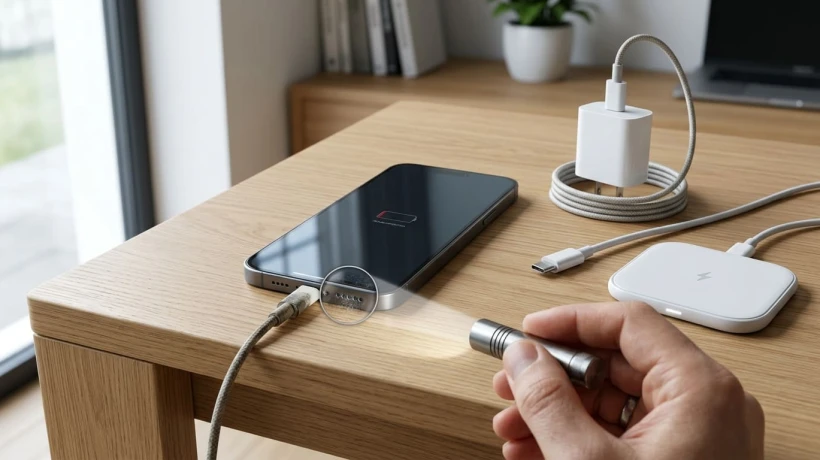
When your phone suddenly stops charging, the cause may be a faulty cable, damaged charging port, moisture, software issue, or battery problem. Learn practical troubleshooting steps to identify the issue and protect your device from further damage.
A phone that suddenly stops charging can be frustrating, especially when the battery is already running low. The problem may seem serious at first. However, charging failures can have several simple causes. A faulty cable, dirty port, software issue, or damaged power adapter can interrupt charging. Therefore, checking the basics first can often identify the problem without unnecessary repairs.
If basic troubleshooting does not restore charging, the problem may involve the phone's charging hardware. In that situation, charging port repair Edmonton can be relevant when the port has physical damage or worn internal contacts. Before seeking professional assistance, however, it helps to understand the possible causes. This can also prevent accidental damage during troubleshooting.
Check the Charging Cable First
The charging cable is one of the easiest components to overlook. Cables experience frequent bending, twisting, and pulling during everyday use. Over time, their internal wires can become damaged.
Inspect the cable carefully from end to end. Look for exposed wires, bent connectors, splits, or unusual discoloration. Also, check whether the connector feels loose when inserted.
If possible, test the phone with another compatible cable. Choose a cable that you know works with another device. If the phone begins charging normally, the original cable may be the problem.
However, avoid using visibly damaged cables. A poor-quality or damaged cable can create additional charging issues.
Test a Different Power Adapter
Sometimes the phone is not the actual source of the problem. The wall adapter may have developed a fault.
Try another compatible power adapter. Ideally, use an adapter that has successfully charged another device.
You can also test another wall outlet. Electrical outlets can occasionally cause unexpected charging problems.
If the phone charges from another adapter and outlet, the original power source likely needs replacement.
Additionally, avoid relying on extremely cheap or uncertified charging accessories. Poorly manufactured accessories may not provide stable power.
Examine the Charging Port
The charging port is another common source of trouble. Pocket lint, dust, and debris can collect inside the opening.
Even a small amount of debris can prevent the connector from making proper contact. As a result, the phone may fail to recognize the charging cable.
Use a flashlight to inspect the port carefully. Look for visible debris, bent contacts, or anything that appears unusual.
Do not insert sharp metal objects into the port. They can scratch contacts or cause electrical damage.
If debris is clearly present, follow the manufacturer's recommended cleaning instructions. Avoid forcing anything into the opening.
Notice How the Cable Fits
Pay attention to how the charging connector behaves inside the port. A properly functioning connection should feel reasonably secure.
If the cable frequently falls out, the port may be worn or damaged. However, loose connections can also result from accumulated debris.
Try gently repositioning the cable without applying pressure. If charging starts and stops when the cable moves, the connection may be unstable.
That symptom can point toward a physical port issue. It may also indicate a damaged cable.
Restart the Phone
Software problems can sometimes interfere with charging detection. Therefore, restarting the phone is a simple step worth trying.
A restart clears temporary system processes. It can also resolve minor software glitches affecting charging behavior.
If the phone has enough remaining battery power, restart it normally. Then connect the charger again after the device boots.
If the battery is completely depleted, allow the phone to remain connected briefly. Some devices need several minutes before displaying a charging indicator.
Check for Moisture
Moisture inside a charging port can prevent charging. Many modern phones include safeguards against charging when moisture is detected.
This feature helps reduce the risk of electrical problems. However, users should respond carefully when a moisture warning appears.
Disconnect the charger and allow the port to dry naturally. Do not use a hair dryer or another high-heat device.
Also, avoid inserting tissues, cotton swabs, or other objects into the port. These materials can leave fibers behind or damage internal contacts.
If moisture exposure recently occurred, take the situation seriously. Water damage can sometimes cause problems beyond charging.
Consider the Phone's Temperature
Extreme temperatures can affect charging behavior. Phones may limit charging when they become unusually hot or cold.
This protection helps manage battery safety. However, it can sometimes appear as though the charger has stopped working.
If the phone feels very warm, disconnect it temporarily. Move it to a cooler indoor environment and let it return to a normal temperature.
Avoid placing a hot phone inside a refrigerator or freezer. Sudden temperature changes can create condensation.
Once the device reaches a normal temperature, try charging again.
Check the Battery Condition
A battery that has reached the end of its useful life can create charging problems. Battery degradation happens naturally through repeated use.
Older batteries may charge slowly or lose power quickly. In some cases, they may also cause unexpected shutdowns.
Modern phones often provide battery health information in their settings. Check this section if your device supports it.
A significantly degraded battery may require replacement. However, battery problems should not be assumed without considering other possible causes.
For instance, a faulty cable can create similar symptoms.
Try Wireless Charging if Available
Some phones support wireless charging. If yours does, this feature can provide a useful troubleshooting comparison.
Place the phone correctly on a compatible wireless charger. Make sure the charging pad itself is connected to a working power source.
If wireless charging works while wired charging does not, the problem may involve the cable or charging port.
This test can provide useful information before seeking professional help. It can also offer a temporary charging option.
However, wireless charging does not repair a damaged physical port. It only helps determine whether another charging method works.
Look for Software Updates
Software updates can sometimes address bugs affecting device functions. Manufacturers may release updates that improve system stability and power management.
Check the phone's software settings when sufficient battery power is available. Install pending updates through the manufacturer's normal process.
Do not interrupt an update once installation has started. If the phone cannot maintain enough power, avoid forcing the process.
Software updates are not a guaranteed solution. Still, keeping the operating system current can reduce certain software-related problems.
Remove Accessories During Testing
Cases and other accessories can occasionally interfere with charging connections. A thick case may prevent a connector from seating correctly.
Remove the phone case temporarily. Then connect the charger directly to the device.
Also, disconnect unnecessary accessories during troubleshooting. This creates a simpler setup and makes the problem easier to isolate.
Once charging works, reconnect accessories individually. This approach can help identify whether one accessory is contributing to the issue.
Pay Attention to Charging Warnings
Modern phones can display several warnings related to charging. These messages can provide useful clues about the problem.
For example, the device may warn about moisture or unsupported accessories. It may also indicate that charging has been paused.
Read the warning carefully instead of dismissing it immediately. The manufacturer's support information may explain the recommended response.
Repeated warnings deserve attention. They may indicate a persistent hardware or environmental issue.
When the Phone Only Charges at Certain Angles
A phone that charges only when the cable is held at a particular angle needs attention. This behavior often suggests an unstable physical connection.
However, do not assume the port is automatically damaged. The cable connector itself may be worn.
Test a known-good cable first. If the same behavior continues, the port becomes a stronger possibility.
Avoid repeatedly bending the cable to maintain charging. That practice can place additional stress on the port.
When the Phone Gets Hot While Charging
Some warmth during charging is normal. However, excessive heat should not be ignored.
Disconnect the charger if the phone becomes unusually hot. Place it on a hard, cool surface away from direct sunlight.
Avoid charging the device under pillows, blankets, or other insulating materials. These conditions can restrict heat dissipation.
If excessive heating happens repeatedly, professional inspection may be appropriate. The cause could involve the battery, charger, port, or another internal component.
When Basic Troubleshooting Does Not Work
Sometimes charging problems continue despite replacing the cable and adapter. At that point, further troubleshooting may not provide a useful solution.
Internal components can fail for several reasons. Physical impact, liquid exposure, corrosion, wear, and electrical faults can all contribute.
A professional technician can inspect the charging system more closely. Diagnostic testing can help identify whether the issue involves the port, battery, or internal circuitry.
Avoid opening the phone yourself unless you have appropriate technical knowledge. Modern devices contain small components that can be easily damaged.
Additionally, opening certain devices may affect their water resistance or manufacturer support.
Protect Your Phone From Future Charging Problems
Prevention can reduce many charging-related issues. Keep charging ports away from dust, liquids, and unnecessary pressure.
Avoid pulling the cable from the phone by its cord. Instead, hold the connector when disconnecting it.
Store charging cables carefully rather than tightly bending them. Excessive bending can weaken the internal wiring.
Use compatible accessories from reliable manufacturers. Also, replace cables when they show clear signs of physical damage.
Furthermore, avoid using your phone heavily while it is exposed to excessive heat. Gaming or demanding applications can increase thermal stress during charging.
Final Thoughts
A phone that suddenly stops charging does not always have a serious hardware failure. Several basic issues can interrupt normal charging.
Start by testing the cable, adapter, outlet, and charging port. Then consider software glitches, moisture, temperature, and battery condition.
Wireless charging can also provide a useful comparison on compatible devices. Meanwhile, charging warnings may offer important clues.
If the problem continues, avoid forcing the connector or repeatedly testing unstable connections. Physical damage can become worse with continued pressure.
Professional inspection may be necessary when basic checks fail. A proper diagnosis can identify the underlying cause and prevent unnecessary component replacement.
Most importantly, treat unusual charging behavior as a warning rather than an inconvenience. Early attention can help protect the battery and other internal components.



Comments
Login to Comment