What Factors Affect the Cost of Home Automation in Dubai?
06 Nov, 2026
8 Views 0 Like(s)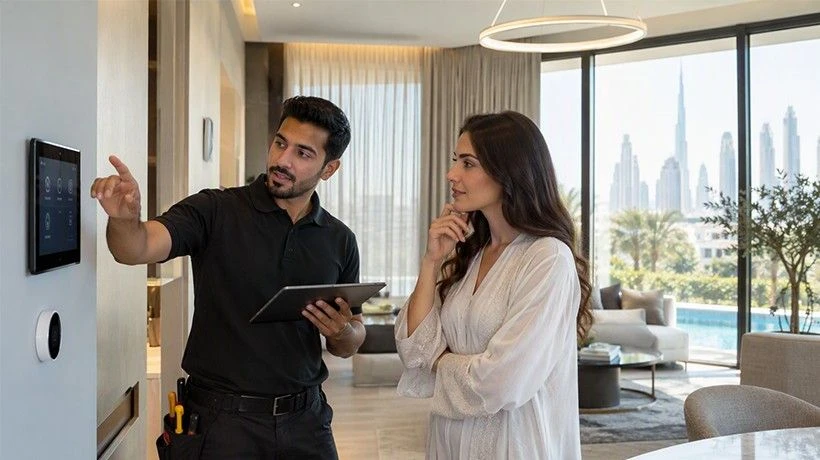
Learn what affects home automation costs in Dubai, including property size, smart devices, installation, technology, security features, and maintenance.
The cost of setting up a smart home depends on several factors, such as the size of the property, the number of devices, the type of technology, and the installation work required. Many people researching Home Automation Companies want to understand these costs before making a decision. A small apartment may need only basic lighting and curtain controls, while a large villa may require a complete system for lighting, security, air conditioning, entertainment, and other features. Understanding these factors can help homeowners plan their budget and choose suitable options.
1. Size and Type of Property
The size of a property is one of the main factors that affects home automation costs. A small apartment usually requires fewer devices and less installation work than a large villa. The number of rooms, doors, windows, and living areas can also change the total cost.
For example, a one-bedroom apartment may need smart lighting, a smart thermostat, and a few automated curtains. A large villa may require separate controls for bedrooms, living rooms, kitchens, outdoor areas, and entertainment spaces.
Property type also matters. Apartments may have limited options for changing electrical wiring or installing certain devices. Villas often provide more space for additional systems, but they may also need more equipment and installation work.
Before planning a system, it is useful to list the rooms and decide which areas need automation.
2. Number of Smart Devices
The number of devices you choose has a direct effect on the overall budget. Every additional device adds to the equipment and sometimes the installation cost.
Common smart home devices include:
-
Smart lights and switches
-
Automated curtains and blinds
-
Smart door locks
-
Motion sensors
-
Temperature controllers
-
Security cameras
-
Smart doorbells
-
Smart speakers
-
Video intercom systems
Some homeowners start with basic lighting and curtain control. Others prefer to connect several systems from the beginning.
It is not always necessary to automate every room. Choosing devices based on daily needs can help control the total cost. For example, motion sensors may be useful in hallways, while automated curtains may be more useful in bedrooms and living areas.
3. Wired and Wireless Technology
The type of technology used in a home automation system can affect the installation budget.
Wired systems use physical cables to connect different devices. They are often considered during the construction or renovation stage because wiring can be planned before walls and ceilings are completed. These systems may require more installation work, especially in an existing property.
Wireless systems use communication methods such as Wi-Fi, Zigbee, or other supported wireless technologies. They can be suitable for existing homes where changing the wiring is difficult.
However, wireless systems may still require compatible devices, network equipment, and proper configuration. The final cost depends on the technology, property layout, and number of connected devices.
Homeowners should compare both options based on installation requirements and future needs rather than choosing only by the initial price.
4. Type of Home Automation Features
Different automation features have different equipment and installation requirements. Basic functions generally need fewer devices, while advanced features may require additional hardware and configuration.
For example, smart lighting allows users to control lights through an app, remote, or voice command. Automated curtains require compatible motors and control units. Smart security systems may include cameras, sensors, alarms, and door access controls.
Some common features include:
Smart Lighting: Allows users to switch lights on or off, adjust brightness, and create lighting schedules.
Climate Control: Helps manage air conditioning and room temperature through smart thermostats or controllers.
Curtain Automation: Allows curtains and blinds to open or close using scheduled settings or mobile controls.
Smart Security: Includes connected cameras, door sensors, motion detectors, and smart locks.
Entertainment Control: Connects televisions, speakers, and other entertainment devices through a central control system.
The more features included in a project, the more equipment and setup work may be required.
5. Installation and Labour Costs
Installation is another important part of the total budget. The cost depends on the number of devices, wiring requirements, property condition, and system complexity.
A new property may be easier to prepare because wiring and equipment locations can be planned during construction. An existing home may need extra work to install cables, replace switches, or connect devices with the current electrical system.
Professional installation may also include:
-
Checking the electrical setup
-
Installing smart switches and sensors
-
Connecting devices to the control system
-
Setting up mobile applications
-
Testing each connected device
-
Explaining how to use the system
The installation cost should be checked separately from the equipment price. This gives homeowners a clearer idea of the total project budget.
6. Central Control Systems and Compatibility
Some smart home systems allow users to control different devices through one central platform. This can make daily use easier, but the required control equipment may increase the project cost.
Compatibility is also important. Not every smart device works with every automation platform. For example, a lighting system, smart lock, and air conditioning controller may use different communication standards.
Before purchasing devices, homeowners should check whether they can work together. Choosing compatible equipment can reduce connection problems and avoid replacing devices later.
A suitable control system should also be easy to operate. Users should be able to manage important functions without needing separate applications for every device.
7. Customisation and System Design
Every property has different requirements. Some homeowners need simple controls for daily activities, while others want personalised settings for different rooms and situations.
Customisation may include lighting scenes, automatic curtain schedules, temperature settings, and security alerts. For example, a homeowner may want one setting that turns off selected lights, closes curtains, and adjusts the air conditioning when leaving home.
Creating these settings requires planning and system configuration. More customised functions may need additional programming and testing.
A clear plan before installation helps avoid unnecessary changes. It is useful to decide which functions are important and which ones can be added later.
8. Maintenance and Future Upgrades
Home automation costs do not always end after installation. Some systems may need software updates, device replacements, technical support, or maintenance over time.
Technology also changes, so homeowners may want to add new devices in the future. A system that supports expansion can make these upgrades easier.
Before selecting equipment, check the availability of replacement parts, software support, warranty coverage, and technical assistance. Also, ask whether new devices can be added without replacing the complete system.
Planning for future upgrades can help avoid extra expenses and make the system more useful over several years.
9. Network Quality and Internet Requirements
A stable network is important for many smart home devices. Cameras, smart speakers, mobile applications, and wireless controllers may depend on a reliable internet or local network connection.
Large villas and properties with several floors may need additional Wi-Fi access points to provide proper coverage. Weak network signals can cause delays or connection problems.
Some automation systems can perform selected functions through a local network without an active internet connection. However, remote access and cloud-based features may still require internet service.
Checking network coverage before installation can help prevent additional work later.
10. Planning a Home Automation Budget
A useful way to manage the budget is to divide the project into smaller parts. Start with the features that solve everyday problems, such as lighting, climate control, or security. Then consider additional functions based on available space and budget.
Ask for a detailed quotation that separates equipment, installation, programming, and maintenance costs. Compare the included features instead of looking only at the final price.
It is also important to check warranty conditions, device compatibility, and future expansion options. A lower initial price may not always provide the best long-term value.
When comparing Home Automation Companies, homeowners should understand the equipment, installation work, system features, and support included in each proposal. This makes it easier to compare different solutions and select a system that matches the property's needs, daily routine, and available budget.

Comments
Login to Comment