How to Remove Wrinkles in Portrait Photography
04 Mar, 2026
5926 Views 0 Like(s)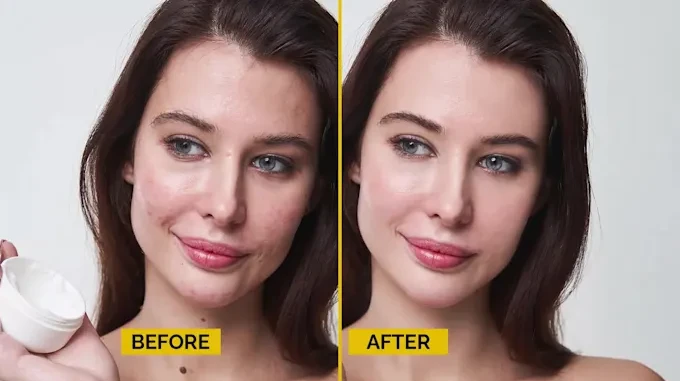
Removing wrinkles in portrait photography is both an art and a science. With the right techniques, tools, and services, you can achieve natural-looking results that enhance your subjects’ beauty without erasing their character.
Portrait photography is an art form that captures the essence of a person’s personality and beauty. However, one common challenge photographers face is how to handle wrinkles and skin imperfections in portraits.
While wrinkles tell a story of life and experience, many clients prefer smoother, youthful-looking skin in their images. Thanks to modern editing tools and professional services, removing wrinkles from portraits has become more accessible and effective. In this article, we’ll explore practical tips, techniques, and services for wrinkle removal in portrait photography.
Understanding Wrinkles in Portrait Photography
Wrinkle removal photo editing involves natural lines on the skin that appear due to aging, sun exposure, facial expressions, and lifestyle factors. While they add character, excessive wrinkles can distract from the main focus of a portrait, the subject’s expression and personality. Photographers aiming for commercial, fashion, or personal portraits often seek methods to reduce or remove wrinkles while maintaining a natural look.
The key to successful wrinkle removal in portrait photography is subtlety. Over-editing can make the skin appear unnatural and plastic-like. Achieving a balance between smooth skin and realistic texture is essential for professional results.
Techniques for Removing Wrinkles in Portrait Photography
1. Using Photoshop for Wrinkle Removal
Adobe Photoshop remains the industry standard for detailed portrait retouching. Photoshop provides several tools that make wrinkle removal precise and professional:
Healing Brush Tool: This tool allows you to sample surrounding skin and paint over wrinkles, blending them seamlessly with the natural texture.
Clone Stamp Tool: The Clone Stamp can replace wrinkled areas with clean, wrinkle-free skin. Careful attention to lighting and texture ensures a realistic result.
Frequency Separation: This advanced technique separates the texture of the skin from its color and tone, allowing you to smooth wrinkles without losing natural details.
For photographers who don’t have time for manual editing, a remove wrinkles Photoshop service can deliver professional results efficiently. These services specialize in making skin look naturally smooth while preserving the unique features of the face.
2. Wrinkle removal photo editing
Wrinkle removal photo editing involves focusing specifically on the subject’s facial lines and skin imperfections. This type of editing can be subtle or more intensive, depending on the client’s needs. Key steps include:
Assessing the Portrait: Identify which areas require wrinkle retouching, such as forehead lines, crow’s feet, and nasolabial folds.
Skin Smoothing: Use gentle skin smoothing techniques to reduce fine lines without making the skin look artificial.
Color Correction: Correct any uneven skin tones or redness that may become more noticeable after wrinkle removal.
Professional wrinkle retouching services excel in this area, using expert techniques to ensure that the skin looks flawless while retaining natural texture and character.
3. Using Portrait Retouching Services
For photographers who want consistent results without spending hours in front of a computer, outsourcing to a portrait retouching service is a smart choice. These services employ skilled editors who specialize in all aspects of portrait enhancement, including:
· Wrinkle removal photo editing
· Blemish removal
· Skin tone correction
· Eye and teeth enhancement
Outsourcing ensures high-quality results while saving time, especially for photographers handling large volumes of portraits, such as weddings, corporate headshots, or modeling portfolios.
4. Mobile and AI Tools
While Photoshop is preferred for professional work, AI-powered mobile apps and desktop software also offer wrinkle removal features. These tools can quickly reduce wrinkles with minimal effort, ideal for casual portraits or social media content. However, for commercial or high-end work, manual editing or professional services remain superior to maintain realism.
Tips for Natural-Looking Wrinkle Removal
One of the biggest mistakes in wrinkle removal is over-editing. Here are essential tips to maintain natural results:
Don’t Remove All Lines: Slight wrinkles around the eyes or mouth can add realism and character to a portrait. Complete removal can make the image look fake.
Match Skin Texture: Use texture-preserving techniques like frequency separation to maintain the natural feel of the skin.
Pay Attention to Lighting: Shadows and highlights contribute to the perception of wrinkles. Proper lighting adjustments can enhance wrinkle reduction without heavy editing.
Use Layer Masks in Photoshop: When using Photoshop, apply wrinkle removal adjustments selectively with layer masks to control exactly where the edits occur.
Check Before and After: Always compare the original image with the edited version to ensure the changes look subtle and natural.
Advantages of Professional Wrinkle Retouching Services
Professional wrinkle retouching services offer several advantages for photographers:
Time-Saving: Editing portraits manually can take hours. Professional services complete the task efficiently.
Consistency: Ensures all images in a batch have uniform quality and style.
Expert Techniques: Skilled editors know advanced methods for wrinkle removal and skin retouching that preserve realism.
Customizable Results: Clients can request subtle adjustments or more dramatic smoothing depending on their preference.
By leveraging these services, photographers can focus more on capturing images while leaving the technical editing to experts.
Choosing the Right Service
When selecting a remove wrinkles Photoshop service or a portrait retouching service, consider:
Portfolio Quality: Review before-and-after examples to assess skill level.
Turnaround Time: Ensure the service can meet your deadlines.
Revisions Policy: Check if the service offers revisions for unsatisfactory edits.
Pricing: Compare costs to find a service that balances quality and budget.
Additionally, clear communication about your desired level of wrinkle removal ensures the final result matches your vision.
Conclusion
Removing wrinkles in portrait photography is both an art and a science. With the right techniques, tools, and services, you can achieve natural-looking results that enhance your subjects’ beauty without erasing their character. From manual Photoshop editing to outsourcing to a professional wrinkle retouching service, there are options for every photographer and budget.
Incorporating subtle wrinkle removal photo editing and leveraging a reliable portrait retouching service ensures your portraits remain polished and professional. Whether you choose DIY methods or professional services, the key is balance—smoothing wrinkles while preserving the individuality and personality that make each portrait unique.


Comments
Login to Comment