Can You Watch Your Car Dash Cam Remotely?
16 Sep, 2026
600 Views 0 Like(s)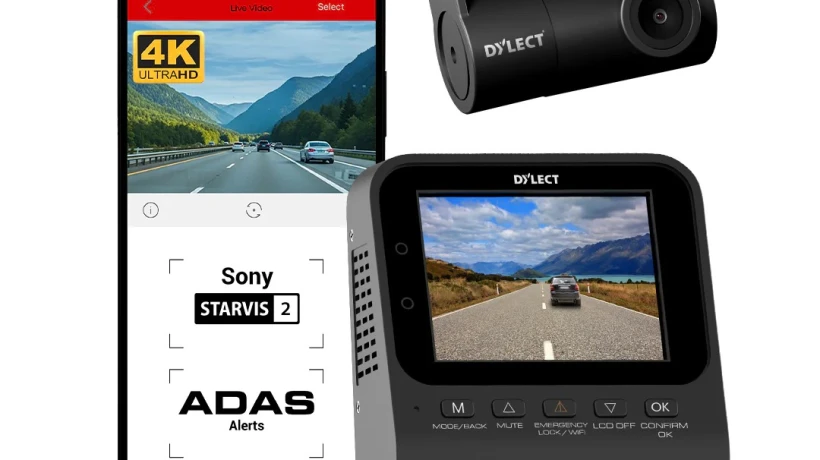
Whether you can watch your car's camera remotely depends on the connectivity and remote-access features of your particular Car Dash Cam. Standard models generally store footage locally, while Wi-Fi models can make nearby smartphone access easier.
A dash cam has become a useful addition to modern vehicles, helping drivers record what happens on the road. From documenting unexpected incidents to providing a record of a journey, these compact cameras can offer practical benefits for everyday driving. As technology continues to develop, some drivers are now looking beyond basic recording and asking whether they can view their vehicle's camera remotely.
The answer depends on the type of Car Dash Cam and the connectivity features included in the particular model. Traditional dash cams generally store recordings on a memory card and do not provide remote viewing. More advanced models may offer Wi-Fi, cloud connectivity, or mobile-app integration that can make remote access possible.
Understanding how these technologies work can help you determine whether a dash cam meets your requirements for vehicle monitoring and recording.
What Is a Car Dash Cam?
A Car Dash Cam is a small camera designed to record video from inside or around a vehicle. Most dash cams are mounted on the windshield or dashboard and record the road ahead while the vehicle is being driven.
Depending on the model, a dash cam may offer features such as:
- Continuous video recording
- Loop recording
- Wide-angle video capture
- Parking monitoring
- Automatic incident recording
- Night recording
- Memory-card storage
- Mobile connectivity
The exact features vary by manufacturer and model, so it is important to check the product specifications before purchasing.
Can You View a Dash Cam Remotely?
Not every dash cam supports remote viewing. Basic models typically record footage locally and require you to remove the memory card or connect the camera to another device to access saved videos.
Remote viewing generally requires additional connectivity. Depending on the model, this may include:
- Wi-Fi
- Bluetooth for limited functions
- Smartphone applications
- Cloud storage
- Cellular connectivity
Wi-Fi-enabled dash cams can allow users to connect a nearby smartphone to the camera. However, this is different from true remote viewing because the phone usually needs to be within the camera's Wi-Fi range.
How Does Remote Viewing Work?
Dash cams that support genuine remote access usually rely on an internet connection. Some advanced systems use cellular connectivity to communicate with a smartphone application or cloud platform.
A typical setup may work like this:
- The dash cam is installed in the vehicle.
- The camera connects to a supported internet or cellular network.
- The user installs the manufacturer's mobile application.
- The camera uploads selected footage or provides access through the connected service.
- The user can access supported features through the application.
This allows certain models to provide information or footage without requiring the driver to physically remove the camera or memory card.
Wi-Fi Dash Cam vs Cellular Dash Cam
It is important to understand the difference between Wi-Fi and cellular connectivity.
Wi-Fi Dash Cam
Wi-Fi can make it easier to transfer videos from the camera to a smartphone. You can connect your phone to the camera's wireless network and access recordings without removing the memory card.
However, Wi-Fi usually works only when you are close to the vehicle.
Cellular Dash Cam
A cellular-enabled system can potentially communicate over a mobile network. This makes it more suitable for genuine remote access when you are away from the vehicle.
Depending on the product and service, cellular connectivity may support features such as remote video access, notifications, location information, or cloud uploads.
These services may require a separate subscription or data plan, so check the manufacturer's terms before choosing a model.
What About Parking Mode?
Remote monitoring is often associated with parking mode. Some dash cams can continue recording when the vehicle is parked, provided the camera is properly powered.
Parking mode may operate in different ways. Some cameras record continuously, while others activate when motion or an impact is detected.
For remote monitoring, the camera may need:
- A suitable power connection
- Parking-mode support
- Sufficient storage
- Internet or cellular connectivity
- Compatible mobile application or cloud service
Not every dash cam provides all these functions, so checking the specifications is essential.
Is Remote Dash Cam Viewing Useful?
Remote access can be useful in several situations. For example, if your vehicle is parked away from home, being able to access supported camera information through an app may provide additional convenience.
It can also be useful for people who want to check whether an incident occurred while their vehicle was parked.
However, remote viewing should not be considered a replacement for physically checking the vehicle. Connectivity can be affected by network availability, power interruptions, camera settings, and service limitations.
Does Remote Viewing Require the Internet?
For true remote access from a different location, an internet connection is generally required somewhere in the communication chain.
A Wi-Fi-only dash cam can usually communicate directly with a nearby smartphone, but it does not necessarily provide access from another city or location.
A cloud-connected or cellular system is more suited to remote access because footage or camera information can be transferred through an internet-connected service.
What Should You Check Before Buying?
If remote access is important to you, do not assume that every Car Dash Cam includes this feature. Check the specifications carefully.
Look for:
- Cellular connectivity
- Cloud access
- Smartphone application support
- Remote live-view capability
- Remote video downloads
- Parking-mode recording
- Motion or impact alerts
- Storage options
- Subscription requirements
It is also worth checking whether the remote features require additional accessories or a separate data plan.
Privacy and Security Considerations
Connected cameras can provide convenience, but they also require attention to privacy and account security.
Choose products from established manufacturers and use strong, unique account credentials where applicable. Keep the camera's firmware and mobile application updated when updates are available.
You should also understand how the manufacturer stores and handles uploaded footage. Review the service's privacy information and cloud-storage terms before enabling connected features.
Power Supply Matters
Remote monitoring can depend heavily on how the dash cam receives power.
A camera that turns off when the vehicle is switched off cannot provide continuous parking monitoring unless it has another suitable power arrangement.
Some parking-mode systems may require hardwiring or a dedicated power accessory. Installation should follow the manufacturer's instructions to avoid creating electrical or battery-related issues.
Choosing the Right Dash Cam
The best dash cam for you depends on how you intend to use it. If your main goal is recording journeys, a basic model with reliable video quality and adequate storage may be sufficient.
If you want to access footage while standing near your car, Wi-Fi connectivity may be useful. If you specifically need remote access while away from the vehicle, look for a model designed with cellular or cloud connectivity.
Consider your priorities before buying rather than choosing a model based only on the number of advertised features.
Final Thoughts
Whether you can watch your car's camera remotely depends on the connectivity and remote-access features of your particular Car Dash Cam. Standard models generally store footage locally, while Wi-Fi models can make nearby smartphone access easier. More advanced cellular or cloud-connected systems may provide genuine remote access, depending on the manufacturer's platform and subscription requirements.
If remote monitoring is important, check for cellular connectivity, cloud services, smartphone support, parking mode, power requirements, and remote-viewing capabilities before purchasing. Understanding these features will help you select a dash cam that matches the way you want to monitor and record your vehicle.
Frequently Asked Questions (FAQs)
1. Can every Car Dash Cam be viewed remotely?
No. Basic dash cams generally store recordings locally and do not support remote viewing. Remote access requires compatible connectivity and software features.
2. Can I watch my dash cam from my phone?
Some models allow smartphone access through a dedicated application. Wi-Fi models usually require you to be near the vehicle, while cellular or cloud-connected models may support access from a distance.
3. Does a dash cam need internet for remote viewing?
True remote viewing generally requires an internet-connected system. Wi-Fi can provide local access but does not necessarily allow you to view the camera from another location.
4. Can a dash cam record while my car is parked?
Some models offer parking-mode recording. The camera may require a suitable power connection and specific settings or accessories for this feature to operate.
5. Do remote dash cams require a subscription?
Some connected dash cams may require a cellular data plan or cloud-service subscription for certain remote features. Requirements vary by manufacturer and model, so check the product's specifications before purchasing.
Comments
Login to Comment