Reviso Software for Modern Business and Healthcare Administration
28 Aug, 2026
490 Views 0 Like(s)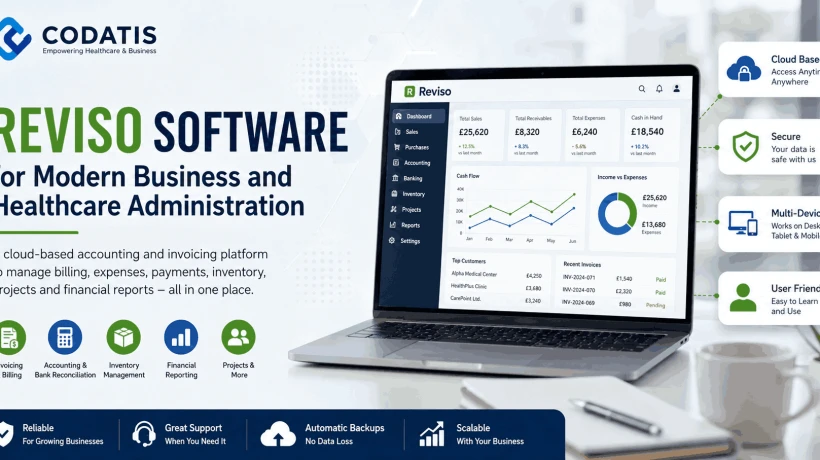
Reviso software is a cloud-based accounting and invoicing platform designed primarily for small and medium-sized businesses, accountants, and bookkeepers. Its capabilities include billing, accounting, expense management, bank reconciliation, reporting, inventory, and project management.
Managing financial and administrative information efficiently is essential for organizations of every size, including businesses that operate within the healthcare sector. While EMR and EHR platforms focus primarily on clinical information and patient care, accounting software serves a different purpose by helping organizations manage invoices, expenses, payments, financial records, and reporting.
Reviso software is a cloud-based accounting and invoicing platform designed primarily for small and medium-sized businesses, accountants, and bookkeepers. Its capabilities include billing, accounting, expense management, bank reconciliation, reporting, inventory, and project management.
For healthcare organizations researching software solutions, understanding this distinction is important. Reviso should not be treated as a replacement for an EMR or EHR system. Instead, it can be evaluated as an accounting and administrative application that may sit alongside healthcare-specific technology.
This guide explains what Reviso does, its features, demo options, pricing, login process, services, and factors to consider before purchasing it.
What Is Reviso Software and What Is It Used For?
Reviso software is a cloud accounting solution that helps businesses manage financial and administrative activities. Its official website describes functionality covering billing, accounting, inventory, projects, sales, purchases, payments, and reporting.
The platform can be used to create quotations, orders, and invoices, record expenses and supplier invoices, manage accounting entries, reconcile bank transactions, and review financial reports.
Because Reviso is cloud-based, users can access their business information through the platform without relying on a private accounting server. Reviso also provides mobile apps for iOS and Android and describes its service as accessible from different devices.
For healthcare businesses, this distinction matters. A medical practice may use a specialized EHR for patient records and clinical workflows while using accounting software separately for financial administration.
Which Reviso Software Features Should You Evaluate?
The reviso software feature set covers several areas of business accounting and financial management. Reviso's official functionality pages group its tools into billing, inventory, projects, general accounting, sales, and purchases.
Billing capabilities can support quotations, orders, invoices, and monitoring of issued and received invoices. The accounting side includes accounting entries, bank reconciliation, VAT-related functions, and management reports.
Other functionality includes:
- Customer and supplier management
- Expense and invoice recording
- Inventory management
- Project management
- Payment and collection management
- Bank reconciliation
- Financial reporting
- Asset management
- Price-list management
- Employee and commission management
The exact tools available can depend on the subscription and additional modules selected. For example, Reviso lists inventory and projects as additional modules on its current UK pricing page.
Businesses should therefore evaluate the features they actually need rather than selecting a plan solely because it contains a large number of functions.
How Can Reviso Support Healthcare Business Administration?
Reviso should not be confused with an electronic medical record or electronic health record. Its primary purpose is financial and business administration rather than clinical documentation.
For a healthcare-related business, this distinction can help when planning a software ecosystem. A clinic or healthcare company may use an EHR to manage patient information, clinical notes, appointments, prescriptions, or other healthcare workflows, while accounting software handles business finances.
Reviso can be relevant to the administrative side of such an organization where its accounting functions meet the business's requirements.
Its billing tools can support quotations, orders, invoices, and customer-related financial processes, while its accounting functions can help with financial records, payments, and reporting.
Before integrating any accounting system with healthcare software, organizations should confirm the available integration methods, data requirements, and privacy obligations for their particular environment.
What Can You See in a Reviso Software Demo?
A reviso software demo can help prospective users understand how the platform works before committing to a subscription.
Reviso provides a 14-day free trial, allowing users to explore the software directly rather than relying entirely on a sales presentation.
A practical evaluation should focus on the workflows that matter most to the organization. For example, a business may want to test how easily it can create invoices, record expenses, reconcile bank transactions, generate reports, and manage customers and suppliers.
Users considering project accounting can also examine how projects, activities, hours, expenses, and material costs are handled. Reviso provides a separate project accounting module for these functions.
Testing real workflows during a trial can provide more useful information than simply reviewing a feature list.
What Is Reviso Software Pricing and How Does It Work?
revisosoftware pricing depends on the subscription selected and the level of activity within the accounting system.
Reviso's current UK pricing page lists two main subscriptions: Small and Standard. The page currently shows Small at £24 plus VAT per month and Standard at £42 plus VAT per month, with quarterly invoicing. The listed plans support up to 4,000 and 10,000 accounting entries per accounting year respectively.
The plans also include different core accounting capabilities, while additional functions can be purchased separately.
Because pricing can change, businesses should verify the current figures directly with Reviso before budgeting or purchasing.
It is also important to look beyond the headline subscription price. Additional users and modules can increase the overall monthly cost.
What Can Influence the Reviso Software Cost?
The reviso software cost depends not only on the base subscription but also on optional modules and additional services.
Reviso currently lists additional modules such as inventory and projects, along with other services including template customization, data migration, and personalized training.
For example, its current UK additional-services page lists inventory and project modules at £12 plus VAT per month each. It also lists optional training and template customization services at separate prices.
Organizations should therefore calculate their expected total cost based on their actual requirements.
Before subscribing, ask:
- How many users need access?
- How many accounting entries are expected?
- Are inventory or project tools required?
- Is data migration necessary?
- Will staff need training?
- Are customized templates needed?
- What support options are available?
This creates a more realistic budget than looking only at the base plan.
How Does Reviso Software Login Work?
The reviso software login process is handled through Reviso's online application. The official login page provides options for live accounts and trial accounts.
Trial users have a dedicated login process, while existing users can access their accounts through the main login interface.
If a user cannot access an account, Reviso provides account recovery options through its login system. Users should always use the official Reviso application or access route provided by their organization rather than entering credentials into an unverified website.
Businesses should also establish appropriate internal access controls so that employees only receive the permissions required for their responsibilities.
What Reviso Software Services Are Available?
Beyond its core accounting functions, Reviso provides additional services intended to help businesses configure and use the platform.
The company's additional-services page lists options including extra modules, customized templates, data migration, and personalized training.
Training is particularly useful when several employees need to understand the same accounting workflows. Reviso lists different training options, including basic, professional, and premium sessions.
Data migration can also be relevant to businesses moving from another accounting system. Reviso states that its data migration service can import information such as customers, suppliers, products, and accounting entries.
These services should be evaluated according to the organization's implementation requirements.
How Can You Get Reviso Software for Your Business?
Organizations looking to get reviso software can start by reviewing the available functions and determining which subscription matches their accounting activity.
The 14-day free trial gives prospective users an opportunity to explore the platform before committing to a permanent account.
A sensible evaluation process can include:
- Identify accounting and billing requirements.
- Estimate annual accounting entries.
- Determine the number of required users.
- Review optional modules.
- Test important workflows during the trial.
- Assess migration and training requirements.
- Review the current subscription terms.
- Compare the platform with alternative accounting solutions.
This approach helps businesses make a decision based on actual requirements rather than assumptions.
Is Reviso Software Free or Does It Require a Subscription?
A common question is, Is reviso software free?
Reviso offers a 14-day free trial, but that should not be confused with permanent free access to the full commercial platform. Its current pricing page lists paid Small and Standard subscriptions after the trial period.
Businesses should check the current terms before starting a trial because pricing, features, and subscription conditions may change.
The trial can nevertheless be useful for testing workflows and deciding whether the platform fits the organization's accounting needs.
What Should You Know Before You Buy Reviso Software?
Before deciding to buy reviso software, businesses should establish whether its accounting and financial-management capabilities match their requirements.
Start by reviewing the core areas of your financial workflow, including invoicing, expenses, accounting entries, payments, bank reconciliation, reporting, and customer or supplier management.
Next, determine whether optional modules such as inventory or project management are necessary. If you are moving from another accounting platform, ask about data migration before implementation.
Healthcare organizations should also remember that Reviso is accounting software rather than a clinical EMR or EHR. If patient records and clinical workflows are required, a dedicated healthcare information system should be evaluated separately.
The right technology setup may involve multiple specialized applications rather than expecting one platform to handle every business and clinical function.
Frequently Asked Questions About Reviso Software
What is Reviso used for?
Reviso is primarily used for cloud-based accounting, invoicing, financial reporting, expense management, payments, inventory, and project-related business processes.
Is Reviso an EMR or EHR?
No. Reviso is primarily an accounting and business-management platform. It should not be presented as a clinical EMR or EHR system.
Does Reviso offer a free trial?
Yes. Reviso currently advertises a 14-day free trial for prospective users.
What are the main Reviso features?
Core functionality includes billing, accounting, customer and supplier management, payments, bank reconciliation, reporting, inventory, and project management. Some capabilities are available as additional modules.
How much does Reviso cost?
Current UK pricing lists Small at £24 plus VAT per month and Standard at £42 plus VAT per month. Additional users, modules, and services can cost extra. Prices should be verified directly with Reviso before purchase.
Can healthcare organizations use Reviso?
Healthcare businesses may evaluate Reviso for accounting and administrative financial processes, but it should not be treated as a replacement for an EMR or EHR. Clinical information should be managed through an appropriate healthcare-specific system.
How do I access Reviso?
Users can access Reviso through its official online login system. Trial users have a separate trial login option, while existing customers can use the main account login.
Should I purchase Reviso for my business?
That depends on your accounting requirements, transaction volume, users, required modules, budget, and existing software environment. Testing the free trial and comparing the platform with alternatives can help determine whether it is appropriate for your business.



Comments
Login to Comment