How EML to PDF Conversion Simplifies Email Archiving: Benefits, Methods & Best Solution
29 Jul, 2026
841 Views 0 Like(s)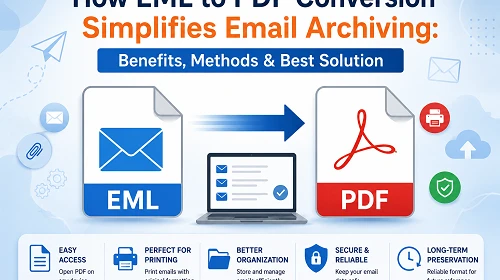
Looking for the best EML to PDF Converter? Learn why converting EML files to PDF is beneficial, compare manual and professional methods, explore top solutions, and choose the right converter for secure email archiving.
Introduction
EML files are a typical format for saving single email messages in email applications such as Windows Mail, Mozilla Thunderbird, Outlook Express, and many other desktop email clients. These files keep the entire structure of the email, but they are not necessarily the best thing to use if you want to share, print or store an email for a long time.
On the other hand, PDF is a document format that is accepted by everyone and can be accessed on any device without the need for an email application. That’s why different users, organisations, legal experts and companies prefer converting EML files to PDF documents.
What is an EML File?
An EML file is a standard file for an email message that contains:
- Email subject line
- Sender and recipient information
- Date & time
- Body of message
- Attachments
- Email Formatting
- Hyperlinks
The EML format is used by many desktop email clients to retain individual email messages. This makes it handy for backups and email exchange.
What is a PDF file?
A PDF (Portable Document Format) is a common document format used to preserve content exactly as intended, regardless of the operating system or device.
PDF files are often used for:
- Legal documentation
- Business records
- E-mail proof
- Storage of invoices
- Digital preservation
- Sharing documents securely
EML files need email software to see the contents, although PDFs need not.
What is EML to PDF Conversion?
EML to PDF conversion is the process of converting email message files into PDF documents, keeping the original content, formatting, graphics and attachments (depending on the solution you pick).
The aim is to make email data more accessible, shareable, printable, achievable and safe for future reference.
Why do we need this conversion?
At some point, most users will need to save emails to a more accessible format. Some of the common reasons are:
- Permanent email records provided
- Share by email with users that have no email app
- Minimise reliance on particular email clients
- More efficient email archiving organisation
Advantages of PDF format
- These files can be opened on Windows, macOS, Linux, Android and iOS without installing an email client.
- This is one of the most reliable formats for long-term document preservation, since it always preserves the original layout.
- PDFs are meant to print out in the correct formatting and page alignment, unlike email files.
- Businesses frequently turn email discussions into PDFs for contracts, project documentation, audits and user communication records.
- PDF documents can be indexed, classified and saved with other business documents.
Solution 1: Manual Way to Convert Emails into PDF Format
There are a few techniques to convert EML emails to PDF documents depending upon the quantity of files you have and your needs.
Manual method: Print EML to PDF
If you have a few EML files, you can use the Print capability offered in compatible email apps.
Steps
- Open the EML file in Windows Mail or any email software that can read EML files.
- Read the email.
- Click File > Print.
- Select the Microsoft Print to PDF printer.
- Choose the destination folder.
- Click Save.
Pros
- Free of Cost
- Good for occasional use
Cons
- One email at a time
- Takes time for large batches
- Attachments often do not convert to PDF
- Folder Hierarchy not preserved
- No customisation options
Solution 2: Expert EML to PDF Converter Software
DataVare EML to PDF Converter
DataVare EML to PST Converter provides an advanced method to convert a batch of EML files to PDF, keeping email layout and structure.
Benefits
- Supports batch conversion
- Maintains email formatting
- Interface facile à utiliser
- Allows you to convert selected files
- Saves time when processing in bulk
Cons
- Full features require a license
- Conversion limits can apply in trial edition
Kernel EML to PDF Converter
Kernel EML to PDF Converter also has an email conversion software that is aimed at users who need to turn EML files into PDF documents while preserving email features.
Benefits
- Converts numerous EML files
- Maintains metadata
- Interface facile à utiliser
- Preview before conversion
- Preserves original formatting
Cons
- Premium features require purchase
- Casual users cannot need advanced features
Solution3: Free Online Converter
FreeConverter.app
FreeConverter.app allows you to upload EML files and convert them to PDF right in your web browser, no desktop software needed.
Pros
- Available for free
- No installation required
- Works in the majority of current browsers
- Good for occasional conversions.
Cons
- Requires an internet connection
- Not great for converting mass emails
- Conversion speed depends on the internet connectivity
How to Choose the Right Solution
Different users have different conversion requirements. Choosing the right approach depends on the volume of emails, security needs, and available resources.
| Scenario | Recommended Solution |
|---|---|
| Convert one or two emails. | Manual Print to PDF |
| Large number of EML files | DataVare EML to PDF Converter |
| Business or enterprise email archiving | Kernel EML to PDF Converter |
| Preserve email formatting | DataVare EML to PDF Converter |
| No software installation preferred | FreeConverter.app |
Conclusion
EML to PDF conversion enables EML emails to be easily accessible, achievable, printable and sharable across multiple platforms. The Print to PDF manual approach is good for single email file conversion but not efficient for numerous email files.
Professional desktop solutions like DataVare EML to PDF Converter and Kernel EML to PDF Converter offer bulk processing, better retention of email attributes and more control over the conversion process. On the other hand, FreeConverter.app provides a simple choice for users who only need to convert a few files without the need for installing any software.
Ultimately, your workflow will drive the optimal option. Free approaches can work for an individual user with very little to convert, but a company or professional converting large email archives would often be better served with dedicated desktop conversion software.
Frequently Asked Questions
Q1. Is there a free way to convert EML to PDF?
Ans. Yes. For simple conversions, you can use the Print to PDF tool or an internet converter.
Q2. Do attachments change while transforming EML to PDF?
Ans. Most manual methods do not have attachments. Many professional conversion software preserves the content of emails and allow better management of linked data, depending on software features.
Q3. Is it safe to use an online converter for confidential emails?
Ans. Although online services can be convenient, firms with tight privacy or compliance requirements might not want to submit important communications. For secret data, offline desktop applications are usually the better choice.
Q4. What is the best way to convert thousands of EML files?
Ans. Software for professional desktops is typically the most effective choice, as it allows for batch processing, maintains formatting, and minimises the need for manual intervention.
Q5. Can I open a PDF without having an e-mail application?
Ans. Yes. You don’t need an email client to open PDF files; any ordinary PDF viewer will do.
Q6. Why do companies use PDF for email archiving?
Ans. PDFs offer consistent layout, wide compatibility, simpler sharing, and reliable long-term archival, making it a useful format for saving crucial email messages.

Comments
Login to Comment