Choosing a Printer for Plastic Cards: A Guide for Food Displays
09 Oct, 2026
18 Views 0 Like(s)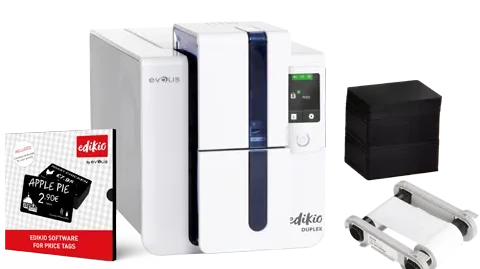
A customer walks into a bakery and spots a tray of fresh pastries. They look great, but the handwritten labels are hard to read and some prices are missing, so staff spend the morning answering the same questions.
For Australian food businesses, professional display cards lift product presentation and make daily pricing far easier to manage. A Food Display Labels Printer lets bakeries, delis, supermarkets and hospitality venues print consistent plastic cards in-house. Choosing the right equipment, though, takes more than comparing purchase prices: card size, print quality, materials and software all affect how well the system works day to day.
This step-by-step guide shows how to select a printer that matches your displays.
Start With Where Your Cards Will Be Displayed
Before comparing models, map out how your cards will be used. A bakery may need small cards for individual cakes, a butcher larger cards showing price per kilogram, and a hotel clear dish names for each buffet station.
Note down:
-
Which products need labels
-
How much information each card must carry
-
Where cards will sit (counter edge, inside a fridge, on a buffet)
-
How often products and prices change
-
Whether customers view cards from more than one side
These answers will guide every choice that follows, from card size to software.
Pick the Right Card Size
Card size has a big effect on readability. Standard cards suit simple names and prices, while longer formats leave room for descriptions, origin or allergen details.
Mock up a few layouts using your real product information before you buy, and check the text fits without crowding. Then consider your display space: an oversized card can hide a small pastry, while a tiny card may be unreadable behind a refrigerated counter. Aim for the size that balances readability with presentation.
Check the Consumables Your Printer for Plastic Cards Uses
Food display cards face refrigeration, moisture, handling and regular cleaning, conditions that quickly ruin paper labels. Purpose-designed plastic cards are more durable and easier to wipe down, but their suitability should never be assumed.
When comparing any printer for plastic cards, confirm its compatible cards are made for food display use. Ask whether they can handle your temperatures, moisture levels and cleaning routine. If cards will touch food directly, check the manufacturer's food-contact specifications. The consumables matter as much as the printer itself.
Decide Between Single-Sided and Double-Sided Printing
A price tag against a bakery counter is usually only seen from the front, so single-sided printing is enough. Buffet tables, island displays and freestanding stands often need information on both sides.
Many card printers designed for food displays come in both versions. If you need double-sided cards, check whether the printer handles both sides automatically and whether that feature is included in the package you're quoted. If your displays only need one side, there's little point paying extra for it.
Test Print Quality With Real Samples
Technical specifications only tell part of the story. Ask for sample cards printed with your own type of content and check:
-
Are product names easy to read from a normal distance?
-
Do prices stand out?
-
Is the text sharp and properly aligned?
-
Do logos and brand colours print consistently?
-
Is there enough contrast between text and background?
View the samples under your shop's normal lighting. Physical cards often reveal readability issues you'd never notice on screen.
Look for Software That Makes Updates Easy
Some retailers change their displays several times a week, whether it's a deli rotating seasonal cheeses or a bakery offering different pastries each morning. In-house printing makes these changes quick, but only if the software is simple.
Look for a food display labels printer whose software offers:
-
Editable, reusable templates
-
Fixed positions for prices and product names
-
Custom fonts, colours and logos
-
Multiple card layouts
-
Data import, where supported
Check what's included in the package and whether staff can learn it without lengthy training. Consistent templates also cut formatting errors when several people create labels.
Work Out Your Cost Per Card
The printer price is only the starting point. Ongoing costs include plastic cards, ribbons, cleaning supplies and maintenance.
Estimate how many new cards you'll print each year. A bakery with a stable range will print far fewer than a supermarket running weekly promotions. Then compare the annual consumable cost with what you spend on labelling now, and include staff time. The most economical system is the one that delivers good results without adding admin.
Keep Your Label Information Accurate
A professionally printed card still has to be correct. Depending on the product, you may need to show prices, units of measurement, ingredients, allergens or country of origin, so check the Australia New Zealand Food Standards Code and relevant consumer information rules.
A printer presents information clearly, but it can't confirm that information is complete or legally sufficient. Set up a simple process for checking prices and descriptions before printing, and remove outdated cards from display promptly.
Why Food-Specific Card Printers Matter
Not all card printers are built for food applications. Models designed for staff ID cards may use different card materials and formats from food display systems.
Edikio Australia offers dedicated printing solutions for plastic price tags and food display labels. The Edikio Price Tag range is designed for retail counters, while Edikio Guest is built for hotel and restaurant buffets. Packs include a printer, card design software and compatible consumables, with options for standard or long cards and single- or double-sided printing. Before purchasing, compare the card sizes, printing options and material specifications against your display needs.
Final Thoughts
Choosing a printer for plastic cards comes down to readability, food-suitable materials, the right card size, easy software and realistic running costs. For Australian bakeries, butchers, supermarkets and hospitality venues, start with your actual display requirements, request sample cards and compare options before investing. The right food display labels printer keeps your presentation consistent while giving staff full control over product labels and prices.



Comments
Login to Comment