Evaluation of 10 OST to PST Conversion Tools Based on User Workflow
03 Jul, 2026
1138 Views 0 Like(s)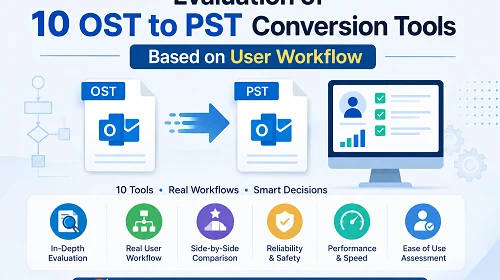
Evaluate 10 OST to PST conversion tools based on real user workflow behaviour, including recovery capability, speed, ease of use, and data safety. This comparison helps users choose the right tool based on real-world usage scenarios instead of feature lists.
Introduction
OST to PST conversion is one of the most needed requirements in Microsoft Outlook data recovery and migration scenarios. This is a frequent requirement for users when they cannot access their Outlook profile, the connection to the Exchange server is lost, or they want to convert mailbox data to a portable PST format.
But selecting the right OST to PST converter is not so easy. At first glance, most tools look identical, but when it comes to the real world, they function rather differently – notably when it comes to dealing with corrupted files, batch processing, integrity of data, and convenience of use.
This blog examines different OST to PST converter software on the basis of actual user behavior, workflow efficiency, restrictions and recovery capacity rather than marketing claims.
What is OST to PST Conversion?
OST (Offline Storage Table) files store synchronized mailbox information from Microsoft Exchange or IMAP accounts in Outlook. These files are associated with a user profile.
PST (Personal Storage Table) files, by contrast, are standalone Outlook data files that can be moved, imported and viewed without any dependence on a server.
OST to PST conversion is the process of extracting mailbox data from an OST file and converting it into PST format so that it can be accessed, backed up or migrated.
Why is OST to PST Conversion Needed?
Here are a few scenarios when the user usually does OST to PST conversion:
- Corruption or deletion of the Outlook profile
- Removal or exchange server downtime
- OST files orphaned due to a system crash
- Move from Exchange to standalone Outlook
- Backup of critical mailbox data.
- Read email offline (no server connection)
The most important thing is always the same: restore data without losing structure or attachments.
Decision Matrix Table
| User Situation | Required Capability | Best Matching Tool Type |
|---|---|---|
| Beginner User | Easy Conversion process | Datavare / TrustVare type |
| OST is healthy, needs a quick PST | Fast and secure Conversion | TrustVare / Mailvare type |
| Large mailbox migration | Batch + stability | Regain / MailsDaddy type |
| Selective email export | Folder-level control | Softaken / eSoftTools type |
| No software installation needed | Online conversion | FreeConverter.app type |
| Outlook profile deleted | Orphan OST recovery | Stellar / Kernel type |
| OST file is corrupted | Deep scanning + repair logic | Kernel / Stellar type |
User- Centered Evaluation Framework
This blog is about comparing tools not by their feature list but by:
- Recovery capabilities
- Easy to operate
- Data integrity protection
- Strength of batch processing
- Hidden restrictions after use
- Suitability for real-world situations
Detailed Analysis of Tools
Datavare OST to PST Converter
DataVare OST to PST Converter software is meant for those who like a basic and straightforward conversion without technical complications.
Key Behavior
It gives a simple interface through which users can add OST files and convert them to PST format with minimal settings.
Strengths
- Very basic interface
- Quick to set up for novices
- Decent performance on small OST files
Cons
- Limited demo version available
- The interface is a bit basic
User Suitability
Best for users who want fast conversion without advanced control.
eSoftTools OST to PST Converter

eSoftTools OST to PST Converter software is aimed at providing a few export alternatives with reasonable control over data selection.
Key Behavior
Selective conversion of folders and viewing of data before export.
Strengths
- Folder-level option
- Has different export formats
- Medium recovery performance
Cons
- Outdated feel to the interface
- Slow with big OST files
- Requires training for advanced options
User Suitability
Good for users who want restricted conversion, not full automation.
TrustVare OST to PST Converter

Trustvare OST to PST Converter is a lightweight software for the quick processing of typical OST files.
Key Behavior
Focuses on speed and ease of use rather than advanced recovery features.
Strengths
- Very user-friendly
- Quick processing for healthy OST files
- Easy to install
Cons
- Preview limited to a few pages
- Not for use in Mac systems
User Suitability
Best suited for simple and uncorrupted OST file conversion.
Stellar OST to PST Converter
Stellar OST to PST Converter is a professional-grade solution for complicated recovery scenarios.
Key Behavior
Employs a deep scanning mechanism for data recovery from OST files that are corrupted or inaccessible.
Strengths
- Robust recovery engine
- Works well on damaged files
Cons
- Maintains folder structural integrity
- Expensive licensing
- Consumes more system resources
- Small learning curve
User Suitability
Best for essential recovery and business environments.
FreeConverter.app
A web-based converter that does not require any installation.
Key Behaviour
Uploads OST files online and performs conversion in the browser environment.
Strengths
- No installation needed
- Quick access
- Easy to use with tiny files
Cons
- Internet reliance
- File size restrictions
User Suitability
For rapid conversions of small, non-sensitive file types.
MailsDaddy OST to PST Converter
MailsDaddy OST to PST Converter is designed for mass and structured mailbox conversion processes.
Key Behavior
It focuses on batch processing and enterprise-level migration processes.
Strengths
- Batch conversion support
- Supports medium-to-large mailboxes
- Uniform performance
Cons
- Limitations of the trial
- Uses system resources for huge files
User Suitability
Good for org or bulk migration scenarios.
Kernel OST to PST Converter
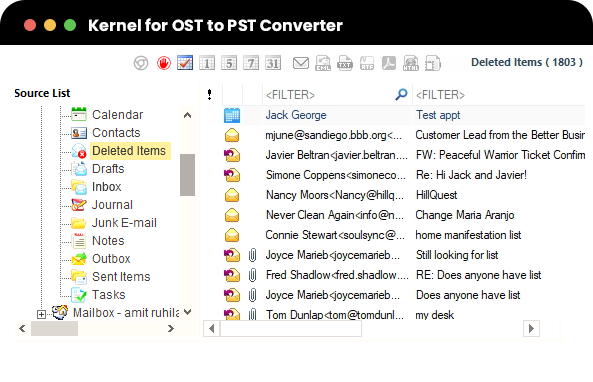
Kernel OST to PST Converter is a powerful recovery-oriented software to restore damaged or inaccessible OST files.
Key Behavior
Sophisticated scanning to restore mailbox data even from damaged OST files.
Strengths
- Great Corrupted File Recovery
- Advanced export controls
- High data integrity
Cons
- The interface is complicated for newcomers
- The scanning procedure is slower
- Improved system utilisation
User Suitability
It is best suited for IT specialists and sophisticated recovery situations.
Softaken OST to PST Converter
A well-rounded tool emphasising usability and consistency of performance.
Key Behavior
Provides regulated conversion with limited recovery features.
Strengths
- Simple to use
- Performance balance
Cons
- Premium features require a licensed version
- The free version has feature limitations
User Suitability
Enough for normal users with normal conversion needs.
Regain OST to PST Converter

Regain OST to PST Converter is a high-performance tool for migrating mailboxes on a wide scale.
Key Behavior
Converts big OST files with organised conversion and enterprise-level processing.
Strengths
- Ideal for large mailboxes
- Great stability
- Enhanced export capabilities
Cons
- High license fees.
- Optimising the system for best performance
User Suitability
Best for enterprise-level migration projects.
Mailvare OST to PST Converter
MailVare OST to PST Converter is a basic free-focused converter for new users.
Key Behavior
Provides safe conversion for simple OST files.
Strengths
- Free basic use
- Very simple interface
Cons
- Limited advanced features
- Basic support for recovery only
User Suitability
Best for casual and beginner users with tiny OST files.
Final Conclusion
Though OST to PST conversion software appears to perform an identical function at a glance, the method of operation of each application varies quite dramatically from each other based upon certain real-world factors, such as file corruption, mailbox size and user expertise level. This is especially true for any of your more critical recovery or corporate migration projects that require more specialized tools that provide in-depth scanning and return the data in a structured manner.
Therefore, your data's functionality is the primary factor in determining which tool you should utilize, not simply the features of the software.
Frequently Asked Questions
Q1. Which is the best OST to PST Converter software for secure conversion?
Ans. Converters like DataVare, Softaken, Kernel and Stellar that offer complete security usually perform better when dealing with important OST files.
Q2. Is a free OST to PST converter reliable?
Ans. Small or healthy OST files might operate with free software, but they are generally restricted to huge mailboxes or corrupted data. They can also be missing advanced capabilities such as selective export and full data integrity protection.
Q3. Is it possible to convert OST files without Outlook or an Exchange server?
Ans. Yes, most of the latest OST to PST converters can work without an Outlook or Exchange server connection. They directly scan the OST file and export it in PST format separately.

Comments
Login to Comment