7 Best Methods to Remove Duplicate Rows From CSV Files Easily
12 May, 2026
1761 Views 0 Like(s)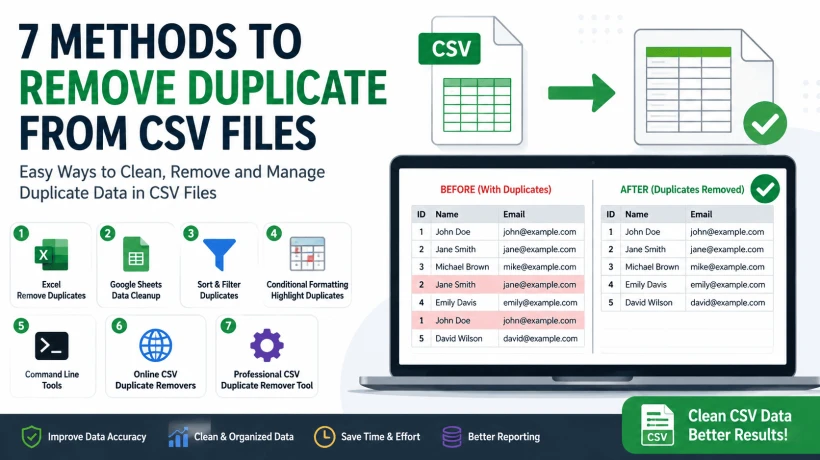
Learn 7 best methods how to remove duplicate rows from CSV files using Excel, Google Sheets, and CSV duplicate remover tools easily.
Duplicate rows inside CSV files can create serious problems during reporting, data analysis, imports, email campaigns, and database management. Many users accidentally end up with repeated records after merging spreadsheets, exporting reports, or combining multiple CSV files together. This guide explains practical and easy methods to remove duplicate rows from CSV files using Excel, Google Sheets, command-line methods, and professional CSV duplicate remover solutions while keeping important data safe and organized.
CSV files are commonly used for storing customer databases, email lists, sales reports, inventory data, analytics exports, and CRM records. However, duplicate entries often appear after merging multiple CSV files, repeated exports, or accidental copy-paste actions. Even small duplicate records can create major issues in reporting and data management.
Duplicate CSV data may cause:
- Incorrect reports and calculations
- Duplicate email campaigns
- Import or sync failures
- Messy and unorganized datasets
- Reduced data accuracy
That is why removing duplicate rows from CSV files is important for maintaining clean, accurate, and reliable data.
Method 1: Remove Duplicate Rows Using Excel
Microsoft Excel is one of the easiest ways to clean duplicate CSV data.
Steps
- Open the CSV file in Excel
- Select the entire dataset
- Go to: Data → Remove Duplicates
- Select the columns you want to compare
- Click: OK
Excel will automatically remove repeated rows from the CSV file.
This method works well for:
- small CSV files
- contact lists
- basic reports
Method 2: Use Google Sheets to Remove Duplicates
Google Sheets also provides a built-in duplicate removal option.
Steps
- Upload the CSV file into Google Sheets
- Select the data range
- Click: Data → Data Cleanup → Remove Duplicates
- Confirm the columns
- Apply changes
This method is useful when users want cloud-based CSV cleanup without installing software.
Method 3: Sort and Filter Duplicate CSV Records
Sometimes users want to manually review duplicate rows before deleting them.
In this case:
- sorting
- filtering
- conditional formatting
can help identify repeated entries. This method is safer when dealing with:
- customer databases
- financial reports
- sensitive CSV data
because users can verify records manually before deletion.
Method 4: Use Conditional Formatting to Highlight Duplicates
Excel allows users to visually identify duplicate rows.
Steps
- Select the CSV data
- Go to: Home → Conditional Formatting
- Choose: Highlight Cells Rules → Duplicate Values
Excel will highlight duplicate records automatically. This helps users review repeated rows before removing them permanently.
Method 5: Remove Duplicate Rows Using Command Line Tools
Advanced users sometimes prefer command-line methods for handling very large CSV files.
Tools like:
- PowerShell
- Python scripts
- Linux sort commands
can quickly process massive CSV datasets.
However, this method usually requires:
- technical knowledge
- scripting experience
- command-line familiarity
and may not be suitable for non-technical users.
Method 6: Use Online CSV Duplicate Removers Carefully
Some websites allow users to upload CSV files and remove duplicates online. Although this sounds convenient, users should be careful when uploading:
- business records
- customer databases
- financial information
- confidential CSV data
to unknown online services. For sensitive data, offline CSV cleanup methods are generally safer.
Method 7: Use a Professional CSV Duplicate Remover Tool
For large or complex CSV files, automated SysTools CSV Duplicate Removal Tool are often the most practical solution. A professional CSV duplicate remover helps users: You can download software here
This tool is most reliable and best option allow you to
- remove duplicate rows from CSV files
- clean repeated entries
- process large datasets faster
- compare specific columns
- maintain original formatting
- avoid manual cleanup mistakes
This becomes especially useful for:
- marketing databases
- CRM exports
- email lists
- inventory management
- business reporting
In many real-world situations, users prefer using a dedicated Tool that because manually cleaning large CSV files inside spreadsheets can become slow and error-prone.
Common Causes of Duplicate CSV Records
Understanding why duplicates appear helps prevent future data issues.
- Merging Multiple CSV Files: When several CSV files are combined together, duplicate records often get imported automatically.
- Repeated Data Exports: Some software exports the same records multiple times during repeated report generation.
- Manual Copy Paste Errors: Accidental duplication during editing is also very common.
- Database Sync Problems: CRM or database synchronization sometimes creates repeated entries inside exported CSV files.
Important Tips Before Removing Duplicates
Always Keep a Backup Copy - Before deleting duplicate rows, save a backup version of the original CSV file. This prevents accidental data loss.
Check Important Columns Carefully
Sometimes rows may appear similar but contain:
- unique IDs
- timestamps
- transaction values
Deleting them incorrectly may remove important information.
Review Data After Cleanup
After removing duplicates:
- sort the data
- review row counts
- verify formatting
to ensure the CSV file remains accurate.
FAQs
Q1. What is the easiest way to remove duplicate rows from CSV files?
Using Excel’s built-in “Remove Duplicates” feature is usually the easiest option for small and medium CSV files.
Q2. Can I remove duplicates from CSV files without Excel?
Yes. Google Sheets, command-line tools, and professional CSV duplicate remover software can also clean duplicate records.
Q3. Is it safe to use online CSV duplicate removers?
For sensitive or business-related data, offline methods are generally safer than uploading CSV files to unknown websites.
Q4. Why do duplicate rows appear in CSV files?
Duplicate records commonly appear after merging files, repeated exports, copy-paste mistakes, or database synchronization issues.
Final Thoughts
Duplicate records inside CSV files may seem like a small issue at first, but they can quickly create serious problems in reporting, analytics, marketing, and database management.
Learning how to properly remove duplicate rows from CSV files helps improve:
- data accuracy
- CSV organization
- reporting quality
- database performance
While basic spreadsheet methods work for smaller files, larger datasets often require faster and more reliable cleanup approaches.
For users regularly handling large CSV exports, using a professional CSV Duplicate Remover Tool can simplify the cleanup process significantly while reducing manual effort and formatting issues.



Comments
Login to Comment