Managing 3.2 Lakh Customer Order Emails: A Real-World GainTools EML Converter Case Study
20 Jun, 2026
1302 Views 0 Like(s)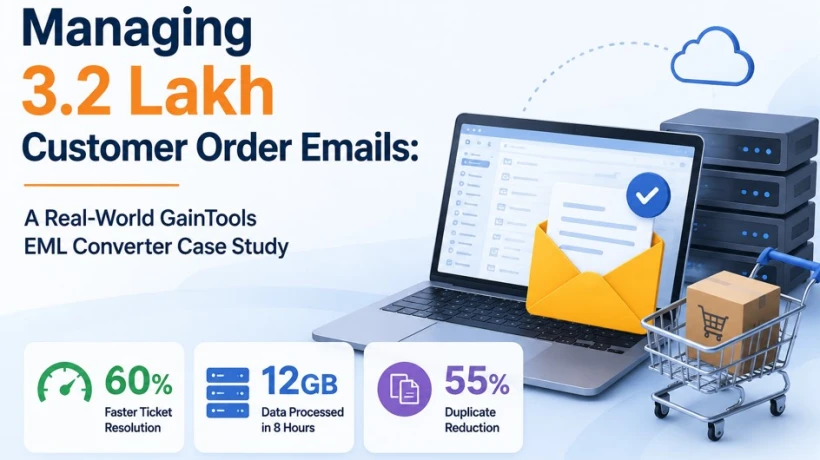
How EML Converter helps in managing 320,000 customer order emails.
The Moment Customer Order Emails Started to Present Operational Difficulties
Over the years, I have handled numerous customer service issues as the Head of Support Operations at NovaCart Retail Pvt Ltd. But one specific occurrence during our yearly mega-sale event strained our support system to its breaking point.
Customer orders significantly increased throughout the sale time. The growth in orders was accompanied by a massive amount of email correspondence. We collected over 3.2 lakh order-related EML files spread across six mail servers in a matter of weeks.
What initially appeared to be a minor archive problem swiftly developed into a significant operational challenge that had an impact customer response times, ticket resolution and support team productivity.
This blog describes how we resolved the issue, the techniques we considered before settling on a specific solution and the outcomes we attained.
The Problem: 3.2 Lakh EML Files Fragmented Among Several Servers
Email records play a major role in our support department's ability to address customer concerns.
The main difficulties we faced were:
· More than 320,000 order confirmation and support emails are kept in EML format.
· Email information is scattered among six different servers.
· Having difficulty in finding previous correspondence with customers.
· Slower ticket processing times.
· Email records that appear to be duplicates in archives.
· Slow reactions during the time of high purchasing demand.
· Support employees are under increasing pressure to promptly retrieve customer order history.
We found that our current plan could no longer meet our operational needs as customer complaints grew.
Manual Methods We Used Before Discovering a Fix
Before purchasing specialized software, our team tried a number of manual approaches.
Method 1: Email Tagging Using Excel
We manually categorized records and exported email data into spreadsheets.
Among the difficulties were:
· Data organizing takes a lot of time.
· Classification errors made by humans.
· Email references are missing.
· Teams have trouble working together.
Method 2: Importing Outlook
Additionally, we tried importing EML files straight into Outlook archives.
This strategy led to other problems:
· There were a lot of duplicate entries.
· The import procedure moved rather slowly.
· Outlook performance issues were brought on by large datasets.
· A few email folders were imported in the wrong way.
· It became challenging to manage several servers.
We discovered after a few weeks of testing that manual procedures were causing more issues than they were resolving.
A Dependable Fix
Our specifications were simple:
· Effectively convert large EML files.
· Maintain the hierarchy of folders.
· Encourage consolidated email administration.
· Cut down on duplicate records.
· Handle massive amounts of data without corruption.
· Make customer communications easily accessible.
We decided to test GainTools EML Converter after weighing several possibilities.
Reasons for Choosing This Solution
The program met a number of important commercial needs.
Important elements that affected our choice were as follows:
· The capacity to convert bulk.
· Both PST and MBOX formats are supported.
· Email metadata preservation.
· The UI is easy to use.
· Quick processing speed.
· The capacity to manage substantial email collections.
· Advanced technical knowledge is not necessary.
Most significantly, it made it possible for us to combine data from all six servers into a single, controllable workflow.
Step-by-Step Process
The deployment procedure was not very complicated.
The steps in our migration process were:
Step 1: Gathering EML Information
· Six servers' worth of email archives were gathered.
· Checked the integrity of the file.
· Folders were arranged by department.
Step 2: Conversion in Bulk
· All EML files were loaded into the program.
· Centralized PST and MBOX output formats were chosen.
· Set up the preservation settings for folders.
Step 3: Verification
· The email structure was confirmed.
· Examined the attachments.
· Verified the accuracy of the metadata.
· Maintained the integrity of consumer order history.
Step 4: Centralized Access
· Converted data was imported into our centralized support system.
· Made support agents' archives searchable.
The entire procedure was finished far more quickly than expected.
Performance Outcomes
The improvements are noticeable within the first few days.
1. Quicker Resolution of Tickets
Customer communications could be accessed by support staff more rapidly.
Outcome:
· A 60% increase in the speed of ticket resolution.
During times of high volume, this directly increased consumer happiness.
2. Considerable Reduction of Duplicates
Duplicate email records were one of our main issues.
Outcome:
· A 55% decrease in duplicate entries.
This decreased misunderstanding among support staff and increased archive correctness.
3. Processing Data on a Large Scale
The program handled a large amount of data with efficiency.
Outcome:
· Within eight hours, 12GB of email data was processed.
The time savings were impressive when compared to manual approaches.
4. Increased Team Efficiency
Other advantages included:
· Faster customer history retrieval.
· Reduced agent workload.
· Improved reporting accuracy.
· Better audit readiness.
· Simplified email management.
Benefits We Experienced
Based on our implementation experience, the greatest advantages were:
· Easy-to-use UI.
· Fast bulk conversion.
· Support for numerous output formats.
· Preservation of email structure.
· Accurate migration outcomes.
· Fewer duplicate records.
· Fit for big businesses.
· There is little learning curve.
· Consistent performance across significant migrations.
These benefits can greatly increase operational efficiency for support teams managing large email archives.
Disadvantages We Found
There were some restrictions, and no software is flawless.
Among the things that should be improved are:
· When dealing with very large datasets, the initial processing time may increase.
· There may be more possibilities for advanced reporting.
· Enterprise settings would benefit from more automation features.
These problems, however, had little effect on our relocation project.
Cost and Purchased License
Pricing is usually a crucial consideration when assessing software.
After comparing a number of market possibilities, we discovered that this solution provided a fair trade-off between price and functionality.
In the end, our company bought the business license because:
· Access was necessary for several members of the support staff.
· A significant amount of email conversion was required.
· Workloads at the enterprise level required a dependable solution.
· The license offered superior long-term benefits.
Lower-tier licenses might be enough for smaller businesses, but our operational needs made the Business License expenditure ($99) worthwhile.
Would I Suggest an EML Converter?
Yes, based on our experience.
The following organizations could profit:
· Online retailers.
· Customer service offices.
· Retail establishments.
· Logistics companies.
· Financial establishments.
· Educational institutions.
· Businesses working on email migration initiatives.
We were able to take back control of a complicated email system that was getting harder to handle because of this software.
FAQs
1. Is it possible for the program to convert several EML files simultaneously?
Large email collections can benefit from its bulk conversion features.
2. Does it keep attachments from emails?
Throughout the converting process, attachments stay intact.
3. Is it possible to open converted files in Outlook?
It is possible to access PST output files using Microsoft Outlook.
4. Is it appropriate for initiatives at the corporate level?
It can effectively manage numerous folders and huge datasets.
5. Does the conversion preserve the folder hierarchy?
After conversion, the original email folder structure is maintained.
Final Verdict
One of the most difficult support operations issues our team had encountered was handling over 3.2 lakh client order emails over six servers. In addition to adding duplicate records and operational inefficiencies, manual methods combining Excel tracking and Outlook imports took a lot of time.
We effectively centralized our email archives, processed 12GB of data in eight hours, reduced duplicate entries by 55% and increased ticket resolution speed by 60% after putting EML Converter into place.
This solution proved to be a reliable and effective choice that produced quantifiable business results for companies dealing with large-scale EML management, email consolidation or migration operations.
Based on our experience, this solution is worth evaluating for organizations that need to consolidate large EML archives or simplify email migration projects.



Comments
Login to Comment