Loop Camera: The Ultimate Guide to Seamless Video Recording
31 Oct, 2026
7 Views 0 Like(s)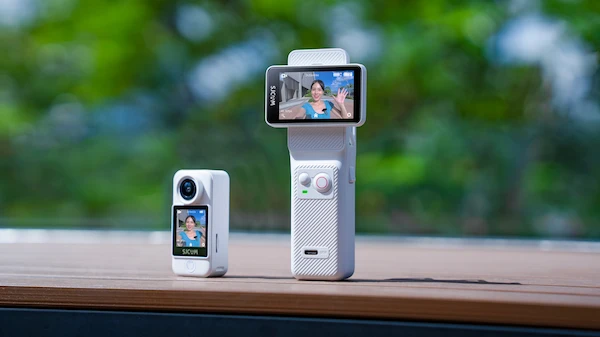
This guide covers everything you need to know about loop recording: what it is, how it works, where it shines, and how to choose the right device.
A loop camera is one of the most practical tools in modern video recording, yet many users overlook its value until they need it most. Whether you are protecting your home, documenting a long road trip, or capturing hours of footage without babysitting your device, understanding how a loop camera works can transform the way you record. This guide covers everything you need to know about loop recording: what it is, how it works, where it shines, and how to choose the right device.
What Is a Loop Camera?
A loop camera is a camera that continuously records video and automatically overwrites the oldest footage once the storage is full. Instead of stopping when the memory card runs out, the camera “loops” back to the beginning and replaces the earliest files. The result is a rolling window of recent footage that keeps updating without manual intervention.
This recording method is also called circular recording or continuous loop recording. You will find it in dashcams, security cameras, body cameras, and action cameras. The core idea is simple: you always have the most recent footage available, and you never have to manage storage yourself.
How Loop Recording Works
The process behind a loop camera is straightforward but powerful:
- Continuous capture. The camera records video in short, fixed-length clips—typically one, three, or five minutes each.
- Sequential storage. Each clip is saved to the memory card in order.
- Automatic overwrite. When the card reaches capacity, the camera deletes the oldest clip and writes the new one in its place.
- Rolling buffer. The camera maintains a constant window of recent footage, from minutes to hours depending on card size and resolution.
Most loop cameras also include an emergency or event lock feature. If the device detects a sudden impact or you press a button, the current clip is protected from overwriting. This ensures critical moments—like a collision or an intruder—are never deleted.
Why Use a Loop Camera?
The advantages of loop recording explain its popularity across so many use cases:
- Set-and-forget operation. Once configured, a loop camera records indefinitely without user input.
- Efficient storage use. You get maximum value from every gigabyte because old footage is recycled automatically.
- Always-on protection. Security and dashcam users capture evidence without worrying about running out of space.
- Low maintenance. No need to regularly transfer or delete files.
- Reliable continuous coverage. Events are recorded even when they happen unexpectedly.
Common Uses for Loop Cameras
Dashcams
Dashcams are perhaps the most familiar loop camera application. Continuous loop recording captures traffic incidents, road hazards, and insurance evidence. Event locking preserves footage of collisions.
Home and Business Security
Security cameras with loop recording provide ongoing surveillance. Motion-triggered clips and locked event files ensure important activity is retained.
Action and Sports Recording
Action cameras use loop recording for long activities like cycling, hiking, or motorsports. When mounted for extended periods, the camera keeps recording without requiring card swaps.
Body Cameras and Field Work
Professionals in delivery, inspections, and security rely on loop cameras to document their workday continuously.
Key Features to Look For in a Loop Camera
When shopping for a loop camera, prioritize these features:
- Adjustable loop intervals. Choose clip lengths (1, 3, 5, or 10 minutes) that suit your needs.
- Event locking / G-sensor. Protects important footage from overwriting.
- Storage capacity. Larger cards mean longer retention windows. Check the maximum supported card size.
- Video resolution and frame rate. Higher resolution captures more detail but consumes storage faster.
- Battery or continuous power. Decide between battery-powered and USB/12V-powered operation.
- Waterproofing and durability. Essential for outdoor and action use.
- Ease of file transfer. Wi-Fi, USB, or app-based transfer makes reviewing footage simple.
Tips for Getting the Best Results
To maximize your loop camera performance:
- Use a high-endurance memory card. Loop recording involves constant write cycles, which wear out standard cards quickly. Choose cards rated for continuous recording.
- Format the card regularly. This keeps the file system healthy and prevents errors.
- Balance resolution and retention. Higher resolution improves detail but shortens the time window before overwriting. Choose settings that match your priorities.
- Test the overwrite behavior. Confirm that event locking works and that critical clips are preserved.
- Keep firmware updated. Manufacturers often improve loop recording stability through updates.
Common Misconceptions
Some users worry that loop recording means losing important footage. In practice, event locking and properly sized memory cards mitigate this risk. Others assume any camera can loop record—but the feature must be explicitly supported and configured in the settings menu. Always verify loop recording capability before purchase.
Recommended Camera: SJCAM C400 Pro
If you are looking for a versatile action camera that supports seamless loop recording, the SJCAM C400 Pro is an excellent choice. It combines high-resolution video capture with practical features for continuous recording, making it well suited to dashcam-style use, outdoor adventures, and extended recording sessions. Its compact design, reliable performance, and user-friendly controls make it a strong option for anyone who wants a dependable loop camera without complexity.
In short, a loop camera is a simple but transformative tool. By recording continuously and managing storage automatically, it lets you focus on what matters—knowing the footage you need is always there. Choose the right device, use a high-endurance card, and you will enjoy seamless video recording for years to come.


Comments
Login to Comment