EML to PDF Conversion: Why Professionals Choose PDF Over EML for Email Archiving
05 Aug, 2026
734 Views 0 Like(s)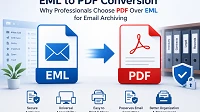
Learn why professionals prefer PDF over EML for email archiving. Explore manual conversion methods, their limitations, and how Softaken EML to PDF Converter simplifies secure email conversion.
Introduction
Emails are not only a way to communicate, but they also contain invoices, contracts, business agreements, user discussions, legal notices, financial records, and other important information. The more companies and individuals depend on email for their day-to-day operations, the more the need to preserve these messages in a safe and easily accessible format.
Most desktop mail clients save messages as EML files. EML files are handy for saving individual emails but are not necessarily the ideal solution for long-term archiving, distribution, or documentation. To open an EML file, you generally require a suitable email client, which can cause accessibility problems when users move devices or email apps. Plus, managing hundreds or thousands of EML files can become quite time-consuming. This is why many professionals opt to convert EML files to PDF documents.
In this guide, you will learn about what EML and PDF files are, what email conversion is, why professionals prefer PDF over EML for archiving, how to convert EML to PDF manually and how a dedicated solution makes the whole process easy.
What Is an EML File?
An EML file is an email message file format that many desktop email clients use to save individual emails. One EML file holds a complete email, including the subject, sender and recipient details, attachments, formatting and other email properties.
This format is supported by many common email applications, such as:
- Mozilla Thunderbird
- Outlook Express
- Windows Live Mail
- Apple Mail
- Other compatible email clients
That’s different from mailbox formats where many emails are kept in one file. Each file with extension .eml is one e-mail. This makes it easier to save essential emails separately and to send individual emails as needed.
What is a PDF?
PDF is one of the most popular document formats in the world. PDF was intended to keep the original look of documents no matter what device or operating system is used, and has become the standard format for sharing, printing and storing vital information.
PDF files don’t require an email application to open, unlike EML files. They can be viewed with any common PDF viewer on Windows, macOS, Linux, Android, or iOS devices.
Here is the information that is in a PDF version of an email.
- Body of email
- Details of the sender
- Recipient information
- Subject
- Date and Time Of
- Photos
- Formatting
- Attachments
Because of its portability and consistent presentation, PDF is popular in corporations, educational institutions, government organisations, and legal offices.
What is EML to PDF Converter?
EML to PDF conversion is the process of converting an email message saved in EML file format to a PDF document, without affecting its original text and formatting.
The converted PDF file can then be viewed, printed, archived or shared without the original email application.
This kind of conversion is usually done when users desire to:
- Business email archiving
- Retain legal correspondence
- Keep financial records
- Forward emails to clients or colleagues
- Print important conversations
- Email archiving for compliance
- Archiving email records for the long term
Conversion of emails to PDF also reduces the reliance on a particular email software and provides the necessary information in the years to come.
Why Experts Prefer PDF Over EML to Archive Emails
EML files are great for keeping single emails, but experts in many industries prefer PDF for saving critical conversations. From law firms and financial institutions to education and corporate offices, PDF has become the format of choice for managing and protecting email records.
- EML files are the best format to store email communications, but user from diverse fields commonly use PDF to archive important messages, which is a common practice in many enterprises – whether legal firms, banks, schools or corporate offices.
- The first explanation for this choice is the easy availability of PDFs. Users need to utilise an email application to view EML files, while in the case of PDF, users can read it on their computer, smartphone, or tablet without installing any software.
- Long-term preservation is also a significant reason. As email applications evolve, some file types can become less accessible with the software. PDF has been one of the most trustworthy and stable document formats for decades, so it’s a great choice for permanent record-keeping.
Thus, converting EML files to PDF is a widely acknowledged pragmatic measure for better email management, increased accessibility and more secure long-term archiving.
How to Convert EML Files to PDF Manually
If you simply have a handful of email files that need converting, you can use simple techniques to make PDF versions without installing dedicated conversion software. These techniques employ the native print function included in most email apps. They are good for occasional use, but not as practical when you have a lot of emails to deal with.
Method 1: EML to PDF Conversion with Microsoft Outlook
Microsoft Outlook users can open EML files and save them as PDF documents using the Microsoft Print to PDF tool in Windows.
Procedure
- Launch Microsoft Outlook.
- Open the EML file in Outlook, or drag & drop the EML file into Outlook if it is associated with EML files.
- Double-click the email to open it.
- Choose File, then Print.
- Choose Microsoft Print to PDF as your printer.
- Click on the Print button.
- Choose a folder to save the destination.
- Type the file name and save the e-mail as a PDF file.
This is a good way to convert individual emails but requires Outlook to be installed and set up on your machine.
Method 2: How to Convert EML to PDF Using Mozilla Thunderbird
Mozilla Thunderbird now allows you to easily save emails as PDF files via the print option.
Steps
- Launch Mozilla Thunderbird.
- Open or import the EML file you need.
- Double-click on the email to view the content.
- Click on File and select Print.
- Select Microsoft Print to PDF as your printer.
- Choose the destination folder.
- Save the email in PDF format.
This method is great if you already have Thunderbird installed, but the same process has to be repeated for every single email.
Disadvantages of Manual Methods
Manual methods are easy, but they have significant practical disadvantages that make them unsuitable for frequent or business use.
- Manual methods depend on specific email tools such as Microsoft Outlook or Mozilla Thunderbird. If they aren’t there or they haven’t set up the tools, the conversion procedure can’t go on.
- Manually managing a large amount of emails is also cumbersome for the users. They struggle with how to organise the converted files, especially in terms of maintaining the folder structure and dealing with different projects.
- Some manual procedures do not keep a consistent record of the properties of the email attachments, especially if there are attached files, photos or presentations.
These drawbacks are the reasons why most individuals choose dedicated software for email conversion in the end.
Professional Solution: Expert EML to PDF Converter
If you convert EML files on a frequent basis or work with large email archives, a specialist conversion software will be a faster and more dependable solution.
Softaken EML to PDF Converter is a Windows software that converts EML email files into PDF documents while retaining the original email content and structure. The software has a straightforward interface that makes the conversion process easy for both expert and non-technical users. The app gives you an effective solution to generate PDF files of your emails without human effort.
It supports EML files created from many email software and turns them into universal PDF documents that can be viewed on nearly any device.
Major Features of This Conversion Software:
- Batch Conversion
- Maintains original email style
- Supports EML Files of Various Email Clients
- Easy-to-use interface
- Maintains Data Integrity
- Fast Processing
- Supports Different Windows Versions
How to convert EML to PDF with this software
Professional Converter makes it easy to convert EML files to PDF format in just a few clicks.
Steps
- Download and install the converter software on your Windows PC.
- Click Browse to add the required EML files or folders.

- Check the chosen email files.

- Select PDF as the output format.
- Choose the destination folder where you wish to save the converted files.

- Click the Convert button to begin.
Once the conversion is complete, open the destination folder to access the converted PDF files.
The entire process is straightforward and suitable for both personal and professional users.
Why Professional Methods Are Better Than Manual Methods
Manual methods are helpful when only a few emails must be converted, but they will become complicated as the number of emails increases. Each email must be opened, printed, and saved, making it a tedious task.
- Professional softwares provide the user with the opportunity to automate the process of conversion and perform bulk conversion by maintaining the integrity of the text and format of emails. As a result, this technology shortens conversion time and decreases the chances of missing a vital email or making a mistake during the conversion process.
- Professional software not only makes the conversion process much simpler, but it also preserves various key aspects of an email like its sender, recipient, subject, date, and other data that are vital for a business.
- Professional software is more effective for converting a large number of emails, even if their number is in the hundreds or thousands; therefore, the process of conversion is smooth.
Final Words
Transforming EML files to PDF gives a more practical and easy-to-use alternative. PDF files can be opened on different devices, keep the format of the email messages intact and can be utilised in business correspondence, legal documents, corporate procedures and long-term storage.
Manual ways of conversion can be effective for infrequent occasions, but they are typically slow and ineffective in situations when many emails need to be converted. For user who want to make the conversion process easier, Expert solution is the best software available today that allows performing the conversion quickly and effectively without losing any important features of the emails.
Frequently Asked Questions (FAQs)
Q1. What is the reason why experts would rather use PDF instead of EML for email archiving?
Ans. PDF files are easier to manage, distribute, print and preserve in terms of their long-term usability. Further, PDF files can be opened on various machines, regardless of whether you have an email reader to open EML files.
Q2. Can the original EML file be changed when it is transformed to PDF format?
Ans. No. The EML file stays unchanged during the conversion process, and only extra PDF files are created based on the EML emails.
Q3. Who can benefit from using an EML to PDF Converter?
Ans. An EML to PDF converter can be used by user working in business, legal professionals, accountants, IT specialists, public servants, students and other users who want to have their EML documents available as PDF files.



Comments
Login to Comment