Before You Trust a Link, Look Closer: A Practical Guide to URL Safety
14 Sep, 2026
9 Views 0 Like(s)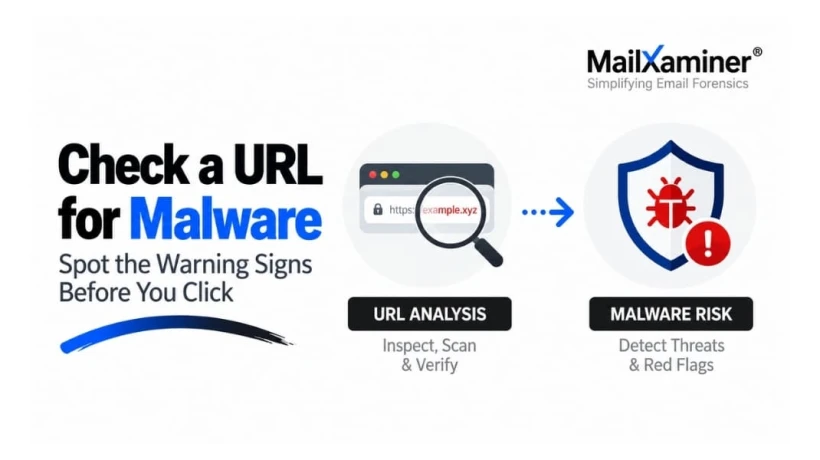
Learn how to check a URL for malware, spot suspicious links, inspect domains and redirects, understand scan results, and investigate URLs found in suspicious emails.
A link can arrive looking completely harmless. It may come from an email that appears professional, a message from someone you know, or a page that uses a familiar brand name. The danger is that appearance is easy to copy.
A safer approach is to slow down for a few seconds and inspect the destination before interacting with it. You do not need to be a cybersecurity expert to do this well. A few simple checks can reveal whether a link deserves your trust or a closer investigation.
Start With the Link, Not the Website
One of the easiest mistakes is clicking a suspicious link just to find out where it goes.
That reverses the order of a safe investigation.
Instead, copy the link without opening it. On a computer, this usually means right-clicking the hyperlink and selecting the option to copy its address. On a phone, press and hold the link and copy it.
Now you have something you can examine without loading the destination.
This small habit creates an important safety barrier. You can investigate the URL first and make a decision second.
When learning how to check a URL for malware, this should be your first rule: inspect before you interact.
Read the Address Like an Investigator
A URL is not just a web address. It contains several pieces of information that can tell you where the link actually leads.
Consider a URL such as:
https://login.microsoft.com.example.xyz/account
At a quick glance, the word "Microsoft" may make the address appear trustworthy. Look more carefully.
The important domain is example.xyz.
The words before it are part of the subdomain. Attackers can use familiar company names in those areas to make a fake destination look legitimate.
This is why simply spotting a brand name inside a URL is not enough.
Look for small inconsistencies too. A single replaced character can create a deceptive address:
micros0ft.com
paypa1.com
amaz0n-support.com
These patterns are often used in impersonation and phishing campaigns. They are not automatic proof of malware, but they are strong reasons to investigate further.
Pay Attention to What the Link Is Asking You to Do
The destination matters, but so does the action it wants from you.
A link that suddenly asks you to:
-
sign in again
-
enter a password
-
confirm payment information
-
download a file
-
install software
-
provide personal information
deserves more scrutiny, especially when the request is unexpected.
Context can be more revealing than the URL itself.
Imagine receiving a message saying, "Your account will be suspended within 30 minutes." The email contains a login button and pushes you to act immediately.
That urgency is part of the investigation.
A legitimate URL can still appear inside a suspicious message. A technically valid website can still be used in a phishing campaign. Looking at the link and the surrounding message together gives you a much better picture.
Check Where the Link Really Goes
Not every URL takes you directly to the final destination.
Some links use redirects, tracking systems, or URL shorteners. The flow may look like this:
Original Link → Redirect → Another Redirect → Final Website
This matters because the first address you see may not be the address that ultimately loads.
A redirect is not automatically malicious. Many legitimate websites use them. The important question is whether the final destination makes sense.
Be more cautious when:
-
the final domain is completely different
-
the link unexpectedly reaches a login page
-
several redirects occur before the destination appears
-
the final page asks for sensitive information
-
the link triggers an unexpected download
A suspicious redirect chain can turn an ordinary-looking URL into a much more interesting piece of evidence.
Use a URL Checker, but Understand Its Limits
Reputation and malware-checking services can be useful for a quick assessment. They may compare a URL against known threat intelligence, reputation databases, phishing indicators, or other security signals.
A result marked malicious deserves immediate caution.
A suspicious result deserves investigation.
A clean result deserves context.
That last point is easy to miss.
A clean scan does not mean a website has been permanently proven safe. A new phishing page may have little history. A recently created malicious destination may not yet have appeared in enough datasets to trigger a warning.
Think of a scanner as a security lookout. It tells you what it can see at that moment. It does not predict everything that may happen later.
That is why the best analysis combines automated results with human judgment.
HTTPS Is Useful, but It Is Not a Safety Certificate
The padlock in your browser can create a false sense of confidence.
HTTPS is valuable because it encrypts communication between your browser and the website. It does not prove that the website is legitimate.
A phishing site can use HTTPS.
A fraudulent website can use HTTPS.
A newly created malicious website can use HTTPS.
So do not ask only, "Does this URL use HTTPS?"
Ask a better question:
"Who controls this domain, where does it lead, and does the site make sense in the context in which I received the link?"
That shift from one signal to several is what makes URL analysis more reliable.
Look for a Pattern, Not a Single Red Flag
A suspicious URL rarely announces itself with one obvious warning.
Instead, several small clues may start lining up.
A familiar brand name appears inside an unrelated domain. The link passes through multiple redirects. The message creates urgency. The page asks for your password. The domain has little history. The final destination does not match the message.
Individually, each detail may have an innocent explanation.
Together, they tell a different story.
This is an important mindset for anyone investigating links: do not hunt for one magic indicator. Build the picture from multiple signals.
When a Suspicious URL Comes From an Email
This is where link checking can become much more serious.
Suppose a suspicious URL appears in an invoice email. You can inspect the link, check its reputation, and examine its redirects. But the URL may only be one part of the incident.
You may also need to know:
Who sent the message?
Was the sender address genuine?
Did similar messages reach other recipients?
What do the email headers show?
Was the same URL found elsewhere in the evidence?
When did the message arrive?
Did the case contain other suspicious links or attachments?
At this stage, the investigation is no longer only about a web address. It is about connecting evidence.
That distinction matters in phishing, business email compromise, account fraud, and other email-related incidents.
URL Analysis Becomes More Valuable With Context
A standalone scanner can help answer:
"Is this URL known to be dangerous?"
A deeper investigation may need to answer:
"Why was this URL sent, who sent it, what else is connected to it, and what does the evidence tell us about the incident?"
This is where Email forensics software can become useful.
A dedicated email investigation platform can help investigators move beyond one URL and examine the surrounding message evidence, related links, headers, timelines, and other artifacts within a case.
For example, MailXaminer includes URL Analysis for examining URLs found within email evidence, alongside broader investigation capabilities designed for email forensics.
The value is not simply seeing a URL marked suspicious.
The value is understanding what that URL means inside the evidence surrounding it.
A Better Habit for Every Suspicious Link
The safest approach is not complicated.
Do not click first.
Copy the address.
Inspect the real domain.
Look for impersonation and unusual URL patterns.
Check redirects and reputation.
Think about what the message is asking you to do.
And when the link comes from a suspicious email, keep the bigger evidence picture in view.
A few seconds of careful analysis can prevent a much longer incident later.
A suspicious link does not need your curiosity to win. It needs your click.
So give it something else instead:
a closer look.

Comments
Login to Comment