Application Usage Monitoring Software: Why Your Business Needs It
09 Apr, 2026
2641 Views 0 Like(s)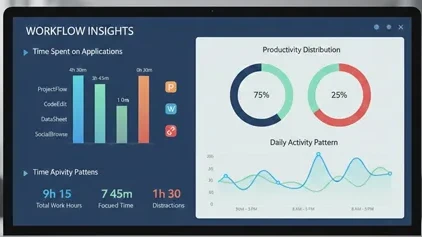
Discover how application usage monitoring software helps businesses track, optimize, and secure software usage while improving employee productivity.
In today’s digital workplace, employees use many applications and software to complete their daily tasks. While these tools improve productivity, they also create challenges for businesses trying to manage software usage, prevent distractions, and optimize resources. This is where application usage monitoring software comes in.
This blog explains what application usage monitoring software is, why it is important, the benefits, features to look for, and how it can help businesses improve performance and efficiency.
What is Application Usage Monitoring Software?
Application usage monitoring software is a tool that tracks how employees use software and applications on their devices. It records details like how much time is spent on each application, which apps are used most often, and when they are being used.
Unlike traditional time tracking or manual reporting, this software provides real-time data about software activity. This helps managers understand employee productivity, identify unnecessary software, and make better decisions about resource allocation.
Why Businesses Need Application Usage Monitoring Software
There are many reasons why businesses are turning to application usage monitoring software:
- Understand Employee Productivity – Many organizations struggle to measure productivity accurately. This software shows which applications employees use, helping managers see where time is spent.
- Prevent Wasted Resources – Sometimes, employees use non-work-related applications during office hours. Monitoring software helps detect and reduce this usage, saving company resources.
- Optimize Software Investments – Businesses invest in many software licenses. Usage monitoring helps identify which applications are actively used and which are underused, so companies can reduce unnecessary costs.
- Enhance Security – Some applications can pose security risks. Monitoring software allows IT teams to spot unauthorized or risky software installations and prevent potential security threats.
- Support Remote Work – With remote work becoming common, it’s harder to track employee activity. Application usage monitoring software provides insights into remote work productivity without constant supervision.
Key Features of Application Usage Monitoring Software
Modern application usage monitoring tools come with a variety of features to help businesses manage productivity efficiently. Here are some key features to look for:
- Real-Time Monitoring – Track application usage instantly and get live reports on which software is being used.
- Detailed Reports – Generate daily, weekly, or monthly reports showing application usage, time spent, and productivity trends.
- Alerts and Notifications – Receive alerts when employees use non-approved or excessive applications.
- Remote Monitoring – Monitor application usage on remote devices, which is essential for hybrid work environments.
- Usage Analytics – Analyze usage patterns to find inefficiencies, software underutilization, or potential distractions.
- Security Control – Detect and prevent the use of unauthorized or potentially harmful software.
- Integration with Other Tools – Many monitoring software can integrate with HR or IT management systems for smooth workflow management.
Benefits of Using Application Usage Monitoring Software
Implementing application usage monitoring software brings multiple benefits to a business:
1. Improved Employee Productivity
By understanding how employees spend time on different applications, managers can guide them toward more productive habits. This can reduce wasted time and improve overall performance.
2. Cost Savings
Monitoring software helps identify underused applications and unnecessary licenses. This allows companies to save money by eliminating unused software subscriptions.
3. Better Resource Allocation
Businesses can assign software licenses more effectively. Employees who need specific applications for their work can be prioritized, ensuring optimal resource usage.
4. Enhanced Security
Monitoring software can prevent unauthorized applications that may introduce malware or security risks. This helps companies protect sensitive information and maintain a secure digital environment.
5. Compliance and Reporting
For industries that require strict compliance, application usage monitoring software provides detailed records of software usage. This can be useful for audits and internal compliance requirements.
How to Choose the Right Application Usage Monitoring Software
Choosing the right software can make a big difference in results. Here are some points to consider:
- Ease of Use – Choose software that is simple to install and easy for both employees and managers to use.
- Customizable Reports – The software should allow you to generate reports that suit your business needs.
- Privacy Considerations – Make sure the software respects employee privacy and complies with data protection laws.
- Scalability – Your software should be able to scale as your business grows and as more employees start using it.
- Support and Updates – Look for software with good customer support and regular updates to fix bugs and improve features.
Tips for Implementing Application Usage Monitoring Software
Implementing monitoring software requires careful planning to get the best results:
- Communicate with Employees – Be transparent about why monitoring is done. Focus on productivity improvement rather than mistrust.
- Start Small – Begin with a pilot program for one department before rolling it out across the organization.
- Set Clear Guidelines – Define which applications should be monitored and the acceptable usage limits.
- Analyze Data Regularly – Don’t just collect data; use it to make decisions, improve workflows, and train employees if necessary.
- Balance Monitoring and Trust – Avoid over-monitoring, which can affect employee morale. Use monitoring as a tool for improvement rather than surveillance.
Real-Life Use Cases
Application usage monitoring software is helpful in many scenarios:
- IT Departments – Identify unauthorized software and ensure all applications comply with company security policies.
- HR Teams – Track productivity trends and identify employees who may need extra support or training.
- Remote Teams – Monitor software usage without constant check-ins, helping remote employees stay productive.
- Cost Management – Detect underused applications and eliminate unnecessary subscriptions to reduce costs.
Conclusion
Application usage monitoring software is a powerful tool for modern businesses. It helps track software usage, improve productivity, reduce costs, and enhance security. When implemented correctly, it can create a balanced and efficient workplace where employees are more productive and resources are used wisely.
The key to success is selecting the right software, being transparent with employees, and using the data to make informed business decisions. Businesses that adopt these tools today will be better prepared for a competitive, technology-driven work environment.



Comments
Login to Comment