What Happens to Your Files After Online Conversion?
04 Nov, 2026
26 Views 0 Like(s)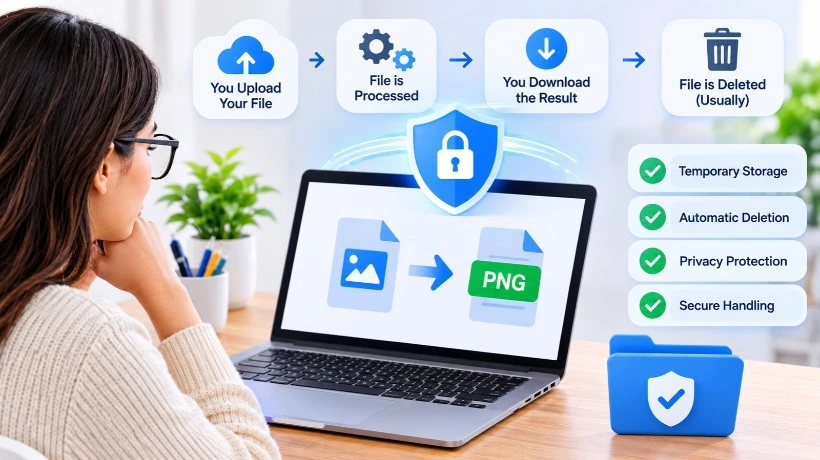
Learn what happens to your files after online conversion, including browser processing, server storage, file deletion, privacy risks, and safety tips.
Online file converters make it easy to change images, documents, audio, and videos into different formats without installing additional software. You simply select a file, choose the format you need, start the conversion, and download the result. But have you ever wondered what happens to your original file after you upload it?
Does it stay on the website's server? Is it stored temporarily? Does the converter automatically delete it after processing? These are important questions, especially when working with personal documents, business files, or private images.
Understanding what happens to uploaded files can help you make better decisions when choosing an online conversion tool. In this guide, we will explain how online file processing works, where files may be stored, and how to protect your information while converting files.
1. What Happens When You Upload a File?
The process usually begins when you select a file from your computer, tablet, or smartphone. Depending on how the converter is designed, the file may be processed directly inside your browser or transferred to the service's server.
With browser-based conversion, your device performs the actual processing. The file can remain on your device instead of being uploaded to an external server. This approach can offer privacy advantages because there is less need to transfer your content over the internet.
Server-based conversion works differently. Your browser sends the selected file to the converter's server, where specialized software processes it and creates the requested output.
For example, converting a large video from MKV to MP4 may require more processing resources than changing a simple image format. Some services therefore use server-side processing for certain file types.
The important point is that not every online converter follows the same process. Understanding where your file goes is the first step toward protecting it.
2. How Online File Conversion Processing Works
After a file is selected, the conversion tool reads its format, identifies its structure, and applies the necessary changes to produce a new file.
For example, when converting a JPG image into PNG, the software decodes the original image and creates a new file using the PNG format. Similarly, document conversion involves reading the original document's content and formatting before generating the requested output.
The process generally involves three stages:
-
File reading: The conversion software examines the original file and identifies its format and content.
-
Format conversion: The software changes the file structure, encoding, or compression according to the selected output format.
-
Output generation: A new file is created and made available for download.
Some conversions happen entirely in the browser, while others require server resources. Certain tools also combine both methods.
This distinction matters because browser-based processing and server-based processing have different privacy considerations. Before choosing a tool, check whether its website explains how different file types are handled.
3. Are Uploaded Files Stored on Conversion Servers?
One of the most common concerns about online file conversion privacy is temporary file storage.
When a service uses server-side processing, it may need to keep an uploaded file on its infrastructure while the conversion is running. The resulting file may also be stored temporarily so that users can download it.
However, temporary storage does not automatically mean that a service keeps your files permanently. Different platforms have different retention policies and technical arrangements.
Before uploading anything important, look for information about:
-
How long original files are retained.
-
Whether converted files are stored separately.
-
Whether automatic deletion is supported.
-
Whether files are accessible through download links.
-
Whether third-party processing services are involved.
-
Whether uploaded content is used for purposes beyond conversion.
A trustworthy converter should explain these practices in understandable language.
Avoid assuming that files disappear immediately after downloading the converted version. Unless the service clearly confirms its deletion policy, you should not treat automatic deletion as guaranteed.
4. What Happens to Your Files After You Download Them?
Downloading the converted file is usually the final step visible to the user, but it does not necessarily end the service's responsibility for handling the uploaded content.
In a browser-based workflow, the resulting file may be created locally and saved directly to your device. In a server-based workflow, the converted file may first be made available through a download link.
What happens afterward depends on the converter's storage and retention practices.
Some services automatically remove temporary files after a specified period. Others may use a scheduled cleanup process. Certain platforms may retain technical records or limited metadata even after the original file is deleted.
It is also important to remember that downloading a converted file does not necessarily remove the original from your device. Your original and converted files may both remain in your downloads folder.
For better file management, keep important originals in a separate backup location and remove unnecessary copies when you no longer need them.
5. How to Convert Files Safely Online
Knowing how to convert files safely online starts with choosing a service that explains its privacy and security practices.
Here are some practical steps to follow before uploading a file:
Check the privacy policy: Look for clear information about file processing, temporary storage, retention periods, and third-party services.
Verify website security: Make sure the website uses HTTPS. This helps protect information while it travels between your browser and the website.
Understand processing methods: Prefer local browser-based conversion when privacy is a priority and the required format is supported.
Avoid uploading sensitive information unnecessarily: Be particularly careful with identity documents, financial records, confidential contracts, and private business files.
Keep original copies: Save a backup before converting important documents, images, or videos.
Review the converted output: Open the resulting file and check that its content, formatting, quality, and functionality are correct.
These simple precautions can make online conversion more convenient without overlooking important privacy considerations.
6. Choosing a Converter That Explains Its File Handling
A good online converter should do more than change one file format into another. It should also help users understand how their content is processed.
Look for services that provide clear information about supported formats, processing methods, website security, and privacy practices.
Easy Converter is designed to make everyday file conversion straightforward through a browser-based workflow. Images, audio, documents, and PDFs are processed privately in the browser, while video conversions are handled on a secure server.
This distinction helps users understand that different file types may require different processing methods. It is also a useful reminder to check how a particular conversion works before uploading sensitive content.
Whether you need to convert JPG to PNG, extract text from a document, or change a video format, choosing a tool with transparent file-handling information makes the experience easier to understand.
Final Thoughts
So, what happens to your files after online conversion? The answer depends on the technology behind the converter. Some tools process files directly in your browser, while others transfer them to servers for temporary processing and download.
The most important thing is to understand where your files go, how they are handled, and whether the service clearly explains its retention and deletion practices.
By checking privacy policies, using secure websites, avoiding unnecessary uploads of sensitive information, and keeping original backups, you can make smarter conversion decisions.
Online file conversion should save time without creating unnecessary uncertainty about your data. Choose transparent tools, understand their processing methods, and convert your files with greater confidence.



Comments
Login to Comment