PST Compact: A Step-by-Step Guide to Shrink a Large PST File without Installing Microsoft Outlook
23 Mar, 2026
4230 Views 0 Like(s)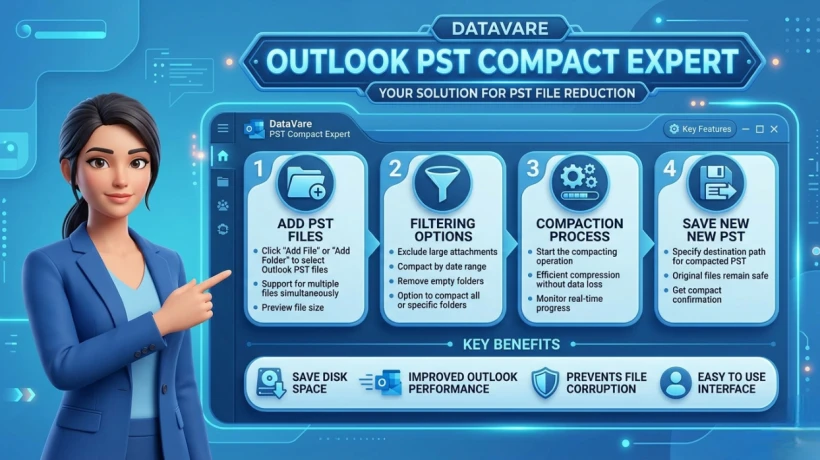
The DataVare Outlook PST Compact Expert Software to safely compress large & heavy Outlook PST files. Over time, unused space accumulates in a PST file, increasing its size & affecting Outlook's performance.
Outlook-Independent Solutions to Reduce PST File Size
Email data grows rapidly these days. Outlook PST files, in particular, can become quite large over time, slowing down performance, increasing the risk of file corruption, and making backups difficult.
In this blog, we'll provide detailed information about PST Compact and explain how you can safely shrink (compact) a large PST file without installing Microsoft Outlook.
What is PST Compact?
PST Compact is a process that reduces the size of a PST file by removing white space within it. The PST file does not instantly get smaller when you remove emails. Compacting removes this unnecessary space and makes the file lighter.
Disadvantages of a Large PST File
- Outlook slows down
- Possibility of PST corruption
- Delays in email access
- Problems with backup and migration
That's why it's important to compact your PST from time to time.
Method 1: Manual Method (Without Outlook, Limited Options)
The truth is, it's not possible to compact a PST manually without Outlook. Outlook's built-in compact feature only works if Outlook is installed.
But you can indirectly reduce the PST size with a few basic steps:
Step-by-Step:
- Back up the PST file
- Save large attachments to a separate, safe location
- Delete unnecessary emails, sent items, and deleted items
- Empty the Deleted Items folder
This method only shrinks the data, it does not technically compact the PST.
Method 2: PST Compact with a Third-Party Tool (Without Outlook, Best Solution)
If you don't have Outlook installed on your system or you want a faster & safer method, a third-party PST Compact tool is the best option.
The DataVare Outlook PST Compact Expert Software to safely compress large & heavy Outlook PST files. Over time, unused space accumulates in a PST file, increasing its size & affecting Outlook's performance. This application reduces the actual size of the PST file by removing the extraneous space.
The biggest advantage of this tool is that it can compact a PST file even without Microsoft Outlook installed. Emails, attachments, contacts and other data remain completely safe during the compaction process.
Key Features of PST Compact Expert Software
- Able to compact PST files without installing Outlook
- Securely shrinks large and oversized PST files
- No data loss, 100% secure process
- Supports both ANSI and Unicode PST files
- Compatible with all Windows versions
- User-friendly interface, easy even for beginners
- Option to save compacted PST files to a new location
How does Outlook PST Compact Expert Software work?
Step-by-Step Process:
- Download and install the software on your system.
- Select the large PST file from the "Add PST" option.
- Select the destination location.
- Start the Compact/Shrink process.
- The reduced-size PST file is ready in no time.
The entire process is fast and secure.
Summary
The manual solution is restricted & does not completely solve the issue if your PST file has grown quite huge so you want to shrink it without installing MS Outlook.
The best, safest, or expert way to reduce the size of your PST file without losing any data in such a scenario is to use an independent PST compact program.
Regularly compacting your PST keeps your email data secure and your Outlook experience smooth.



Comments
Login to Comment