From EML Files to Organized PDFs: A Practical Review of TrustVare EML to PDF Converter
07 Oct, 2026
12 Views 0 Like(s)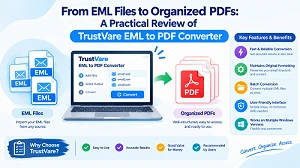
TrustVare EML to PDF Converter, focusing on its features, workflow, usability, and practical applications for email archiving. It explains the benefits of converting EML files to PDF for easier sharing, documentation, and storage, while also covering limitations, backup considerations, and factors to review before handling large email archives.
Introduction
EML files are used to store single email messages outside of an email application. These files can be accumulated over time by users through email exports, backups, mailbox transfers, or archived correspondence. EML preserves an email’s content, but working with a large collection of message files can be unwieldy if the data must be shared, reviewed, stored, or accessed outside an email client.
PDF provides a more document-based approach to dealing with archival communication. It can save email content in a legible format and is useful for long-term documentation, sharing, and record-keeping. EML to PDF conversion is handy for users who want to convert dispersed mail files to more organized documents.
This evaluation will review the conversion software from a practical standpoint, including its workflow, supported features, output processing, usability, and applicability for diverse email archiving requirements.
Benefits of Converting EML to PDF Files
Conversion is often necessary when email data is to be handled outside of the original mail context. EML files can be saved to different directories, backup sites, or storage media; therefore, they are less practical for everyday document management.
There are a few practical benefits of converting these messages to PDF files:
Better accessibility: PDF files can be opened on multiple systems without relying on a specific email client.
Easier sharing: Email records can be shared as normal documents, not as individual message files.
Better documentation: Important correspondence can be stored as document records.
Easy archiving: You can sort and save the transformed messages with other documentation in PDF format.
Email information preserved: Email messages and associated information can be kept accessible in a more user-friendly document form.
What We Reviewed in This Conversion Software
TrustVare EML to PDF Converter is designed for those who want to convert EML messages to PDF documents. The conversion method provides a specialized way of handling email files instead of compelling users to open and store each email separately.
One benefit of specialized software is that it concentrates on email-to-document transformation without forcing users to rely on other applications. This can be especially useful if you are working with old messages that are no longer being regularly managed through an email account.
Key Features to Consider
Handling of EML Files and Folders
A usable conversion tool should make it easy to discover and include the necessary source files. This is more significant when EML messages are stored in various directories.
Processing by folders can also enable users to work with groupings of connected messages, rather than treating each email as an isolated item.
Preserving the Email Content
The quality of a converted document depends on how well the information from the original message is kept. Key components can include sender and recipient identification, subject, date, message text, and other available email data.
Keeping these elements will help make sure that the resulting document stays useful for reference and record-keeping purposes.
Attachment and Data Preservation
Attachments are an important part of email messages. So, users should take into account how the information about the attachment is handled during the conversion and whether the PDF representation meets the documentation requirements.
This is especially important for corporate correspondence, stored communication, and email records with supporting files.
Formatted and Structured Outputs
When a large number of messages are transformed, the arrangement of the output is an important aspect of the process. A proper filename and a suitable destination location can make the final PDF archive easier to browse.
An organized output procedure is particularly helpful if the source archive consists of messages from multiple discussions or time periods.
How the Conversion Workflow Works
The conversion process with this tool is simple:
1. Open the conversion utility in your system.
2. Add EML files or folders holding email messages.
3. Review the selected email data before proceeding with the conversion.
4. Select PDF as your export format and choose where you want it saved.
5. Begin the conversion process to create document versions of the specified messages.
6. Check the resultant PDFs to ensure that the necessary email information is still included.
This approach helps reduce repetitive manual methods and provides a simpler solution for converting emails into PDF documents.
What Works Well for Email Archiving?
The primary practical benefit of such software is its concentration on turning email archives into a more easily distributed and managed documentation form.
It can be helpful to users working with:
· Archived correspondence
· Business email records
· Legal or administrative documents
· Email archives from the past
· Backup EML files
· Email details for offline reference
The PDF format also allows you to save transformed messages with other document data.
Limitations to Consider
Users should consider the size and structure of their source archive before using any email conversion application. The demo version has limitations, which may not be sufficient for beginners who want to evaluate the software before making a purchase.
The pricing could also be more suitable for individual users, while those handling large migration tasks may need to purchase the full version to complete the conversion. Users should also check the converted files after processing, especially when messages contain extensive formatting, attachments, or specialized email content. Keeping the original EML files as a backup is another useful precaution, as they provide a source copy that can be referenced if any information needs to be verified at a later date.
Who Is It For?
This type of converter is most relevant to users who have collected EML files and need them in a document-compatible format. This can be a good solution for both individuals who are keeping personal archives and corporations that need to save email records for reference, documentation, or long-term archiving.
It’s not so much about just altering one file extension but rather about producing a manageable archive of documents out of email-based data.
Conclusion
Converting EML messages to PDF can help you better organize, share, and reference your saved conversations. If you have plenty of message files, not just individual emails, then specialized conversion software can make this much easier.
If the main requirement of the users is to convert stored email messages to organized PDF documentation, then a professional conversion solution can be a better choice. But users need to check the generated files, validate key email details, and keep their source data before treating the converted archive as the only copy.
FAQs
Q1. Why do I need to convert EML to PDF?
Ans. Converting EML files to PDF provides simpler sharing, organization, archiving, and access to email content without needing a dedicated email application.
Q2. Can I convert several EML files into PDF files?
Ans. Yes, conversion software can help process many EML messages, making it more practical to deal with email archives containing many files.
Q3. Do I need to keep the original EML files after conversion?
Ans. Yes. It is best to keep the original files as a backup, as they provide a source copy for checking email information later.
Q4. What email information can be preserved during conversion?
Ans. Depending on the original message and the conversion software, information such as the sender, recipient, subject, date, message body, and other available email details can be preserved.
Q5. Can the demo version be used for large email conversion tasks?
Ans. The demo version has limitations and might not be sufficient for users with greater conversion or migration needs. The full version may be required for larger tasks, so users should check the available limitations before making a purchase.


Comments
Login to Comment