Finding a Selfie Editor That Doesn’t Make You Look Fake
28 Feb, 2026
6223 Views 0 Like(s)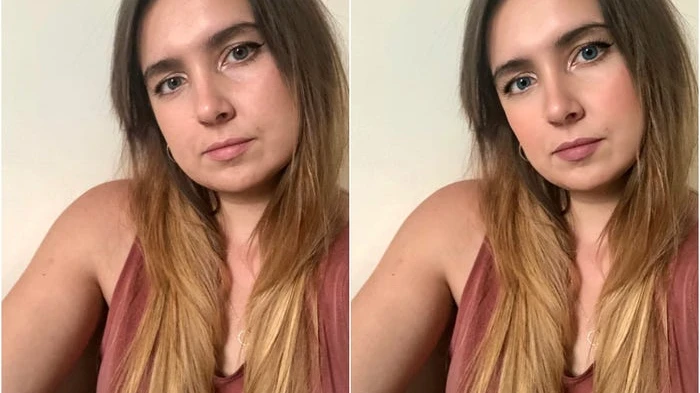
We’ve all seen it. Someone posts a selfie that’s been smoothed and filtered so heavily it barely looks like a real person. Skin like plastic, eyes that glow unnaturally, a jawline that clearly wasn’t there five minutes ago. Heavy editing has given selfie tools a bad reputation. But the tools aren’t really the problem. It’s how people use them, and more importantly, which ones they pick. A good editing app should help you look like you on a great day, not turn you into someone else entirely. The trick is knowing what to look for and what to avoid.
Why Most Edits End Up Looking Overdone
A lot of selfie apps default to heavy filters. You open the app, take a photo, and before you’ve touched a single setting, your skin has already been blurred into oblivion. It might look fine on a tiny phone screen, but zoom in and it’s obvious. The texture is gone. The details that make your face yours have been wiped clean.
Some apps are built to give you a dramatic before-and-after moment. They crank everything up so the change is noticeable, which is great for marketing screenshots but not for photos you actually want to post. The best selfie editing apps take the opposite route. They start subtle and let you decide how far to push things.
What Actually Makes a Good Tool
The most important feature to look for in any selfie editor is adjustable intensity. If you can’t dial an effect up or down, you’re stuck with whatever the app decides looks good, and that’s usually too much. Look for sliders or manual controls for each effect, whether it’s skin smoothing, teeth whitening, or eye brightening.
Here’s a quick checklist of features worth looking for:
- Individual sliders for each effect so you can fine-tune everything separately.
- Accurate facial detection that places edits where they belong.
- Realistic color palettes for lips, blush, and eyes, not neon options.
- A before-and-after toggle so you can compare your edit to the original.
- Support for a wide range of skin tones and face shapes.
An app that checks most of these boxes is usually going to land among the best selfie editing apps on the market. One that skips them is going to leave you with results that look off.
Red Flags Worth Watching For
If an app doesn’t let you compare the edited photo to the original side by side, that’s a problem. You need to see what’s changed. If the only way to undo something is to start completely over, that’s another one. And if the tool only handles lighter skin tones well or struggles with certain face shapes, it probably wasn’t built with a diverse enough dataset, which means the results will be hit or miss for a lot of people.
Pay attention to what happens when you stack multiple effects, too. Some of the best selfie editing apps handle layering well. You can smooth skin, adjust lighting, and add a touch of color without the effects clashing. Others fall apart when you add more than one or two tools, leaving you with a muddy, overprocessed mess. If the app can’t handle more than one edit at a time without looking strange, it’s probably not going to give you what you need.
Making the Most of Whatever You Pick
Even with a great tool, a few habits go a long way. Edit a photo that was taken in good lighting. Harsh shadows and dim rooms make it harder for any app to do its job. Start with the smallest adjustment and build from there. It’s always easier to add than to undo. And if you’re editing for a specific platform like Instagram or LinkedIn, check how the photo looks at the size it’ll actually display. What looks fine full-screen might read differently as a tiny thumbnail.
Here’s an underrated tip: show someone else. It’s easy to lose perspective after staring at your own face for ten minutes. A quick second opinion can tell you whether your edits look natural or whether you’ve crossed into uncanny valley territory. The goal isn’t perfection. It’s a photo that looks like you on a really good day. And once you find a selfie editor you trust, it becomes second nature to make quick, clean edits without overthinking it.

Comments
Login to Comment